
Table of Contents

How to Find My Public IP Address on SiteGround and Hostinger?

Finding your public IP address on SiteGround and Hostinger is essential for managing DNS settings and ensuring your domain points to the correct server. On SiteGround, log in, navigate to “Website,” select the site, and access “Server Details” to view your public IP address. On Hostinger, log in, go to “Web Hosting,” and select “Plan details” to find the public IP. Knowing your public IP is crucial for setting up A records, making it easier to manage your website's DNS configuration on either platform.
Blog cover for finding public IP address on SiteGround and Hostinger.

Knowing how to Find my public IP address is a crucial step for managing our website’s DNS settings. This guide will walk you through the process of locating your public IP address on both SiteGround and Hostinger. Knowing your public IP address is essential for setting up A records and ensuring your domain points to the correct server.

Siteground

Step 1: Log in to SiteGround, click on “Website,” select the website you want to add the A record for, click the three dots on the right, and choose “Website Settings.”
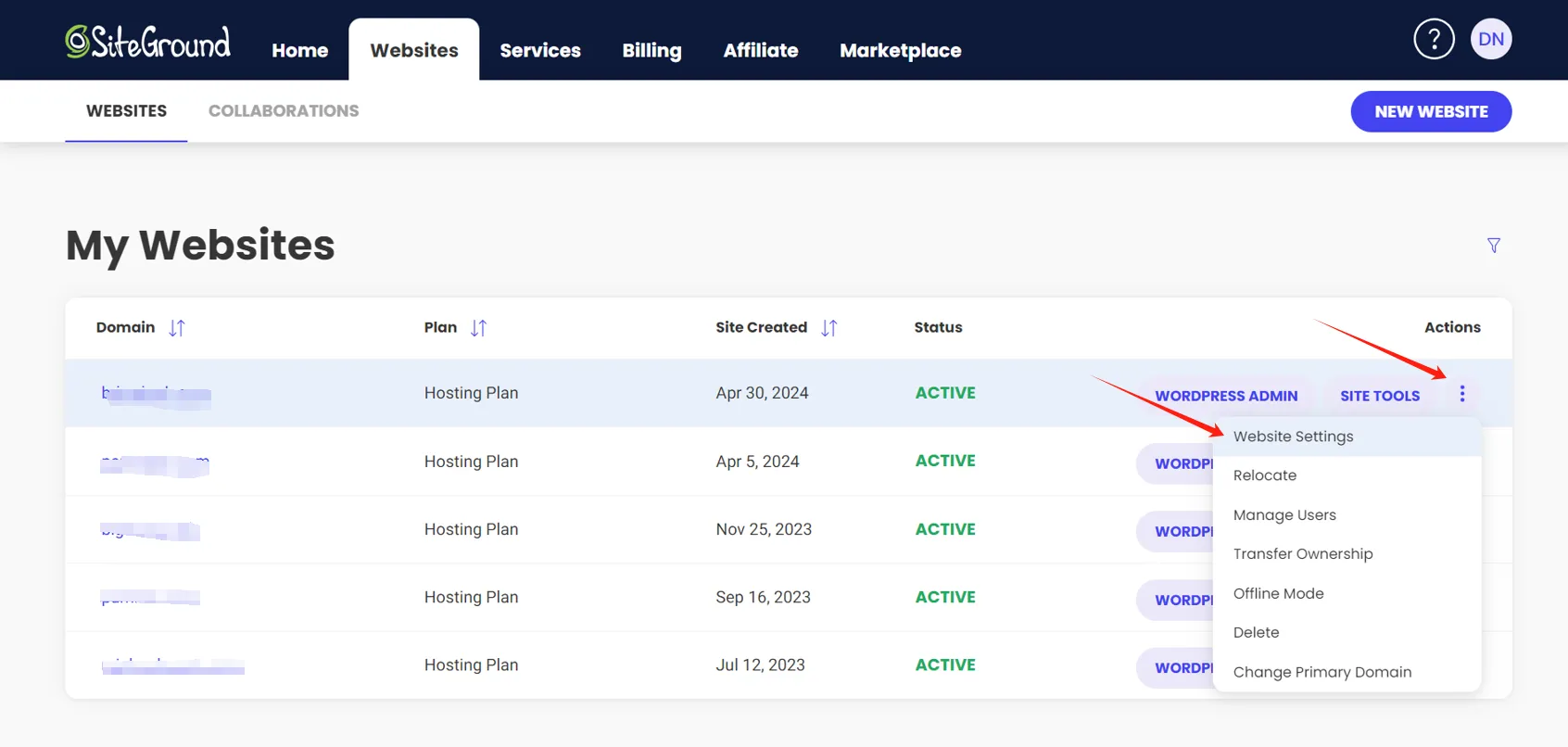
Find my public ip address on siteground - login to siteground

Step 2: Click the three dots on the right again and select “Server Details.”

Find my public ip address - SiteGround server details page

Step 3: In the middle of the page, you will see the public IP address assigned to you by SiteGround. You can also find the NS (Name Servers) information below.

SiteGround server details with IP address and name servers

Hostinger

Step 1: Log in to Hostinger, click on “Website,” then click the three dots next to “Web Hosting” and select “Plan details.”

Hostinger hosting plan details page

Step 2: Find the public IP address assigned to you by Hostinger. You can also find the NS (Name Servers) information on the right side.

Hostinger website details with IP address and name servers

By following these steps, we will be able to easily find my public IP address on both SiteGround and Hostinger, facilitating the setup of our DNS records and ensuring our domain is correctly pointed to the server.


author avatar
Danny SEO
Danny Ni is an experienced SEO specialist with expertise in WordPress and digital marketing. Currently working at a company, he is responsible for SEO optimization, website development, and managing multiple social media platforms. With a strong focus on SEO, WordPress, and digital marketing, Danny helps businesses enhance their online presence and grow their digital footprint.

Share on:

Share on: