Guess how many marketers still rely on email daily?
A whopping 82% of marketers actively use email campaigns.
(Source: Litmus, 2023 State of Email Report)How often do people check email on their phones?
99% of email users peek at their inbox at least once a day—most check it multiple times.
(Source: OptinMonster, 2024 Stats)Email’s insane ROI:
For every $1 spent, email marketing brings back $36–$40!
(Source: Litmus & DMA)Email vs. Social Media? No contest.
Email converts 3x more than social media ads.
(Source: Campaign Monitor, 2023 Benchmarks)Why do brands still love email?
77% of consumers prefer promo emails over social media ads.
(Source: Statista, 2023)Most underrated marketing asset?
Your email list—it’s more reliable, longer-lasting, and higher-converting than social media followers.
(Source: HubSpot, 2023 Trends)
In this blog, we’ll break down how newbies can dive into email marketing.
When you’re just starting out, email marketing might seem confusing—how to build a contact list, whether to send emails manually, what the ideal sending frequency is, and so on. But don’t worry! Before diving into the details, let’s map out the entire workflow. Here are the 7 essential steps to follow.
1. The 7 Key Steps to Getting Started with Email Marketing
(1) Figure Out What You Want to Achieve
Goals — Are you looking to drive more website traffic? Boost sales conversions? Keep users updated about software releases? Or strengthen brand awareness?
Audience — Will you be sending cold outreach emails? Regular check-ins with existing customers? Or newsletters with updates and product announcements to subscribers?
Every combination of goals and audiences calls for a different email strategy. But no matter who you’re targeting, all email marketing falls into two main categories: Permission-based Email Marketing and Cold Email Outreach. We’ll break down both approaches in detail below.
(2) Choose the Right Email Marketing Platform
Email marketing definitely doesn’t mean using your personal email to send mass emails every day. This approach will cause most emails to end up in spam folders and damage your email sender reputation, potentially getting your domain blacklisted. That’s why you must use professional email marketing tools to significantly reduce these risks.
For beginners choosing these tools, you need to consider cost and user-friendliness. Options like MailerLite, Mailchimp, and Kit (formerly ConvertKit) are good choices. I particularly recommend trying MailerLite, which offers a 30-day free trial and has an extremely simple interface that’s very beginner-friendly.
These professional tools provide practical features like template creation, automation tools, subscriber management, and data analytics – far superior to sending emails directly from your personal account.
Later in this guide, we’ll walk through the setup steps for one of these tools.
(3) Build and Grow Your Email List
Successful email marketing requires either an audience that actively wants your emails or a targeted list of potential customers for outreach. Later, we’ll cover specific methods like website signup forms and social media campaigns to grow your list organically, as well as how to use professional tools to find contact details of your ideal prospects – including both emails and phone numbers.
One critical reminder: Every step of this process must comply with legal regulations. Cutting corners here can lead to serious consequences, so always prioritize permission and compliance over quick list growth.
(4) Segment & Organize Your Email Contacts
Not every subscriber is the same—some may be casual readers, while others are ready to buy. By grouping them based on their interests, industry, or where they are in the buyer’s journey, you can send more relevant emails, which boosts both opens and sales.
(5) Create Targeted Email Campaigns
This step is directly tied to your goals and target audience. For example:
- Send new product announcements to users who registered but haven’t made a purchase.
- Offer discount codes to those who abandoned their carts to encourage checkout.
- Deliver birthday rewards to loyal members to boost retention.
- Introduce your services to cold leads via tailored outreach.
Each objective and audience segment requires a different campaign approach. The tools and strategies you use will vary—whether it’s automated flows, one-time broadcasts, or sequenced cold emails. The key is matching the right message to the right group.
(6) Craft Compelling Email Content
The key to an effective email lies in its content:
- Does the subject line grab attention?
- Does the body deliver real value?
- Is it personalized (e.g., using the recipient’s name)?
- Does it include a clear call-to-action?
Avoid overly salesy language in subject lines—words like “Buy now!” or “Limited offer!” can trigger spam filters. Instead, focus on curiosity or benefit-driven phrasing.
On the technical side, ensure your emails avoid the spam folder by setting up SPF, DKIM, and DMARC authentication. These protocols verify your domain’s legitimacy and improve deliverability. A well-crafted email is useless if it never reaches the inbox.
(7) Analyze Data & Continuously Optimize
After hitting send, your job isn’t done—it’s time to dig into the data. Track key metrics like open rates, click-through rates, and unsubscribe rates to spot what’s working (and what’s not). Use these insights to refine your next campaign for better results.
Now that we’ve established a clear understanding of the email marketing process, let’s categorize it into two main types based on your goals and target audience.
2. The Two Main Types of Email Marketing: Permission-Based and Cold Outreach
(1) Permission-Based Email Marketing
By definition, this refers to sending emails to subscribers who have voluntarily opted in to receive your updates—whether it’s newsletters, product launches, promotions, or other valuable content. These email addresses are collected through sign-up forms on your website or social media, often incentivized with compelling offers, and then managed through automated email marketing platforms for scheduled communications.
As the most fundamental and reliable form of email marketing, its power lies in consent: your audience actively chooses to hear from you, which means you already have their trust and interest.
Key Features & Benefits
- Users willingly share their emails via signup forms on your website, landing pages, social media, blog posts, and ad destinations – no coercion needed.
- You can keep the conversation going with your audience through welcome emails, automated follow-ups (like birthday reminders or abandoned cart messages), and regular newsletters – it’s all about staying connected in a natural way.
- Industry experts consistently rank this as the most effective way to build customer loyalty, drive repeat purchases, and strengthen brand awareness – it’s simply the gold standard for relationship marketing.
Common Use Cases (Including But Not Limited To)
- E-commerce cart abandonment reminders
- DTC brand new product launches
- Content creators’ weekly/monthly digests
- SaaS product feature updates
- B2B industry insight sharing
Practical Tips for Execution
- Use professional email marketing tools like MailerLite to set up automated workflows for your subscribers.
- Give people a compelling reason to subscribe – like ‘Get 10% off your first order’ or ‘Download our free industry whitepaper’ – because ‘Join our newsletter’ alone rarely works anymore.
- Your emails should focus on delivering real value first – think helpful tips, exclusive insights, or curated resources. Remember, trust drives long-term results, not one-time clicks.
(2) Cold Email Outreach
Cold email outreach is a direct and proactive marketing strategy, ideal for businesses and professionals looking to quickly connect with potential customers, partners, or distribution channels.
Key Features & Advantages
- These are cold contacts—emails you’ve gathered from directories, events, LinkedIn, or websites, with no prior relationship.
- Effective cold emails follow a simple three-part structure: introduction, offer, and clear call-to-action—always keeping it short, relevant, and personalized.
- More affordable than ads with higher-quality conversions—especially for B2B deals.
Key Considerations for Cold Email Outreach
- Proper email authentication (SPF, DKIM, DMARC) is non-negotiable—it’s your first defense against spam folders.
- Ditch the generic blasts—send targeted, one-goal emails that scream personalization and value.
- Compliance is key—always follow GDPR (EU) and CAN-SPAM (US) rules to avoid legal risks.
Recommended Tools
- Email finding and cold email sending tool: Apollo.io
Now that we’ve covered the two main types of email marketing – permission-based and cold outreach – let’s dive into how to actually execute them.
3. How to Launch Permission-Based Email Marketing
(1) Create Your Signup Form
Create an email subscription form in WordPress
Use WordPress editors like Elementor’s Form widget to create a subscription form on your webpage. As shown in the image below:
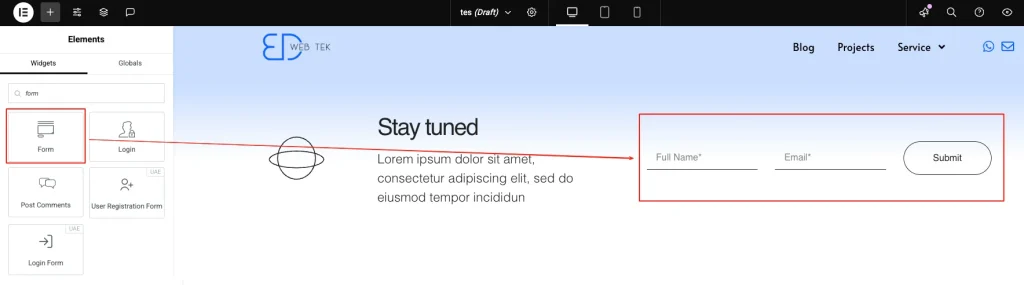
Then, in the Form’s ‘Action After Submit’ settings, add two actions:
‘Collect After Submissions’ – This saves subscribers to your WordPress user database. (Optional if integrating an email tool, as subscribers will be captured there automatically.)
‘MailerLite‘ integration – Connects to MailerLite’s automated email system. This professional yet beginner-friendly tool offers an intuitive interface and affordable pricing, with new accounts eligible for a 30-day free trial.
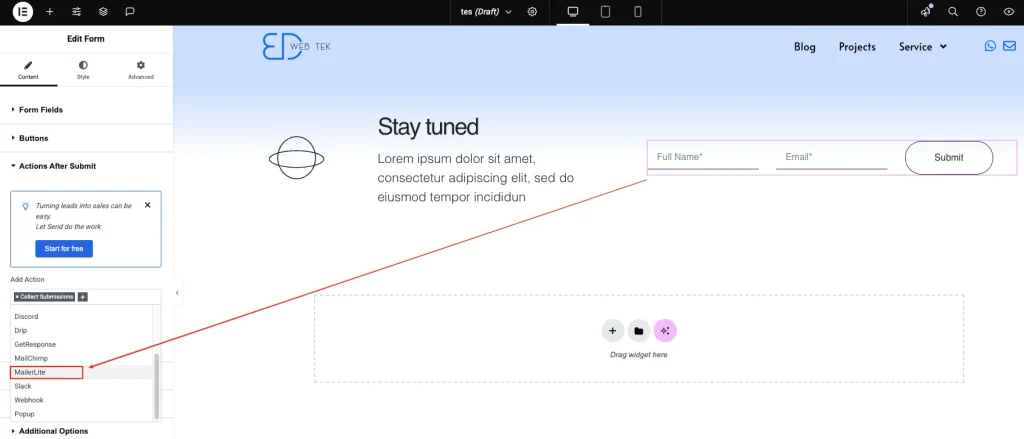
We can pre-configure email marketing workflows for various purposes (like abandoned cart reminders, new product launches, automated discount codes, software updates, etc.). After selecting MailerLite in the form’s ‘Action After Submit’, just enter the API to integrate it with your website’s subscription form – this will automatically trigger your desired email workflows.
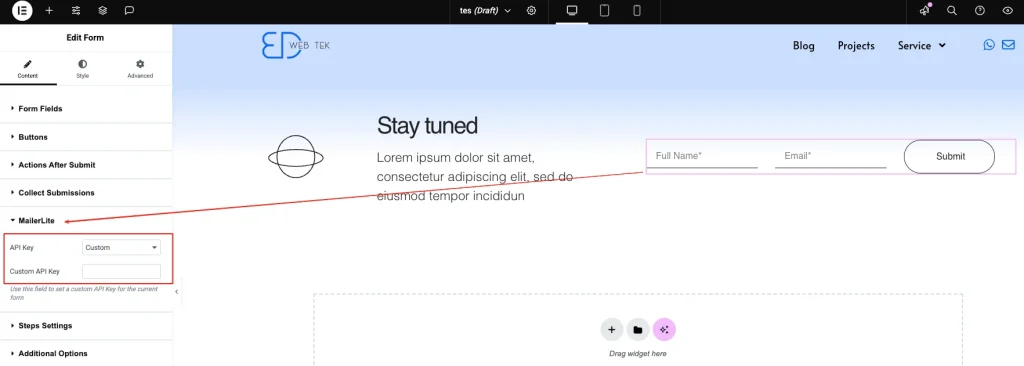
We’ll cover detailed MailerLite-WordPress integration in a dedicated blog post later—let’s skip that for now.
Create an Email Subscription Form in Shopify
Use the ‘Email signup’ block in your theme editor to add a subscription form.

Go to the Shopify App Store and install the ‘MailerLite Email Automation’ plugin.
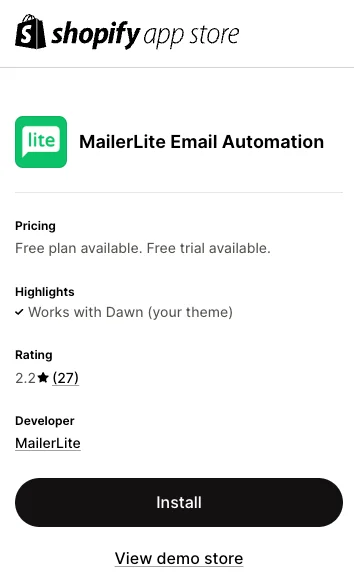
After installation, click ‘Connect’ to link your Shopify store with MailerLite.
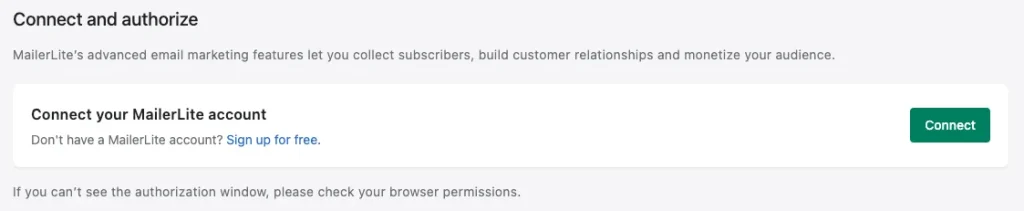
Create a Subscription Form on Facebook
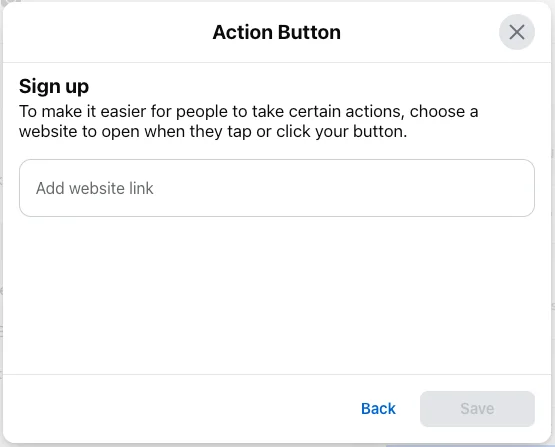
Go to your Facebook Page, click the three dots (‘…’), and select ‘Add Action Button’ (Note: If you’ve already added one, it will show as ‘Edit Action Button’ instead, as seen in the screenshot).

To collect subscriber emails, we’ll use the ‘Sign Up’ button feature.
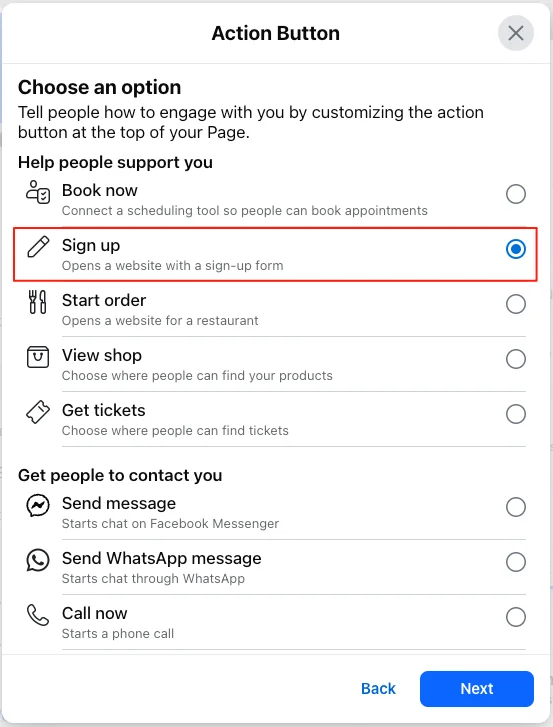
Enter the URL of your email signup page—this lets you collect subscriber addresses directly through Facebook for email marketing.
(2) Setting Up Email Marketing Workflows
Register for a professional email marketing tool—you can use MailerLite [click to sign up], which offers a 30-day free trial.
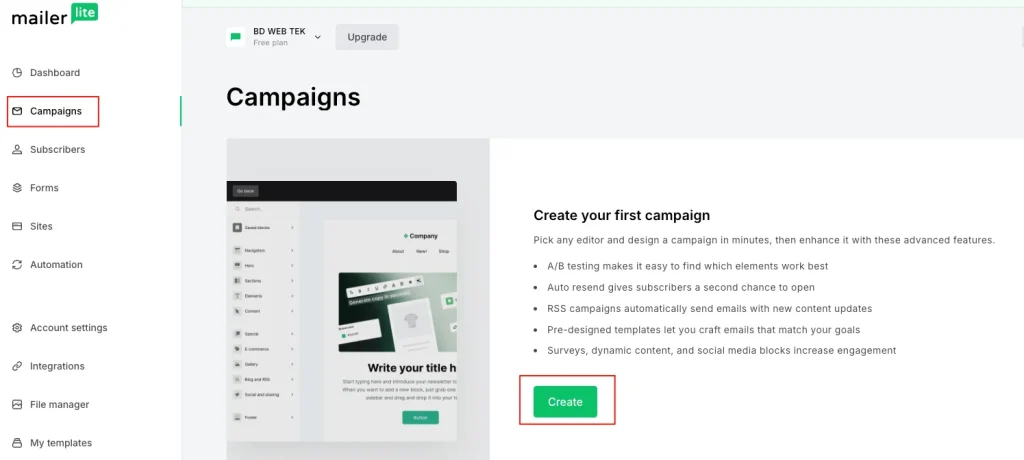
Then log in to the dashboard, select ‘Campaign’ from the left sidebar, and click ‘Create’ to begin.
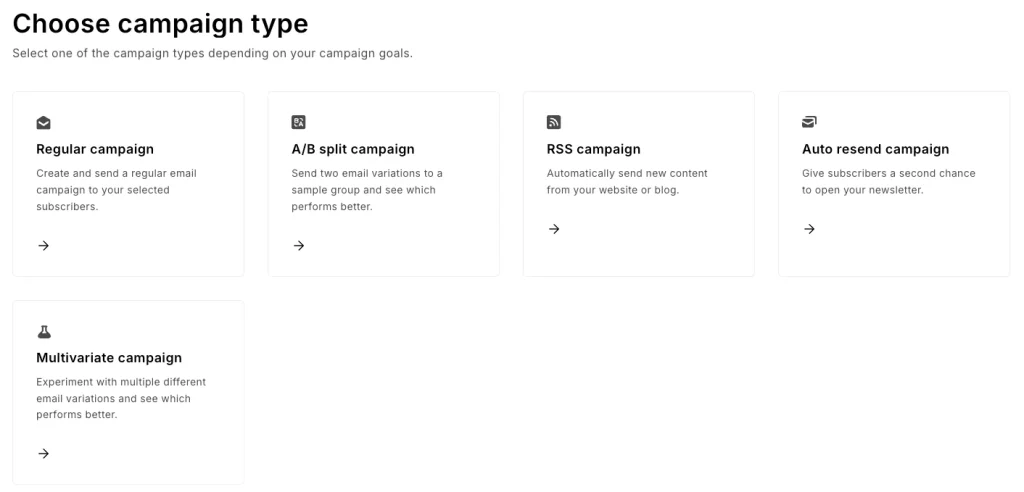
Here, you’ll find multiple campaign types to choose from—we’ll start with a Regular Campaign.
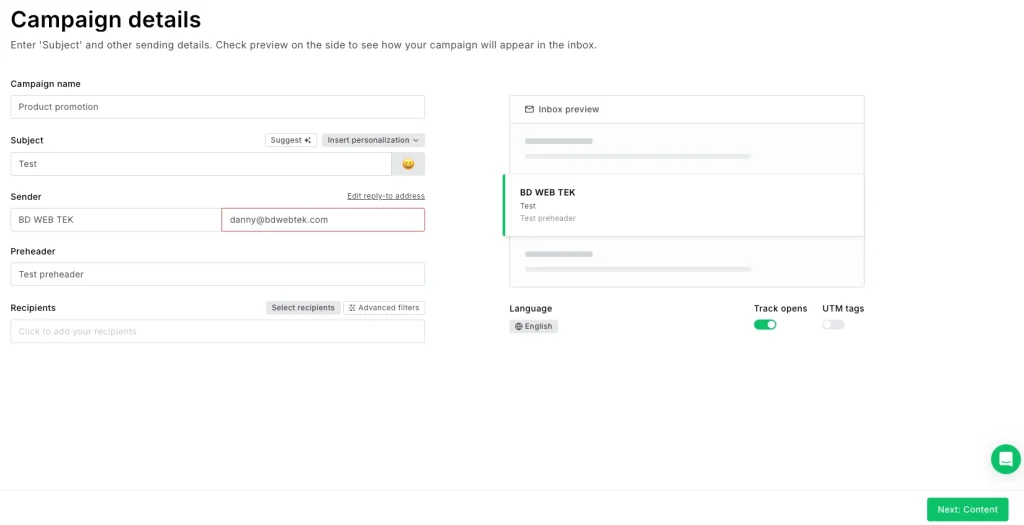
Fill in the campaign details, including the campaign name, email subject line, sender (which needs verification), email preview text, and more.
We’ll cover detailed MailerLite setup and campaign creation in a dedicated blog post later—no need to go deeper here.
4. How to Start Cold Email Outreach
Compared to permission-based email marketing, cold outreach is more direct and proactive. It boils down to two key steps: finding potential leads and setting up automated email sequences.
Find Potential Customer Emails
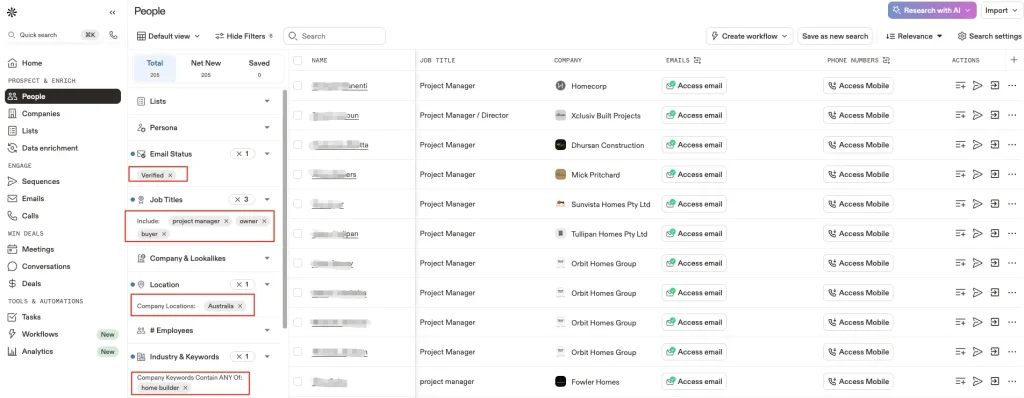
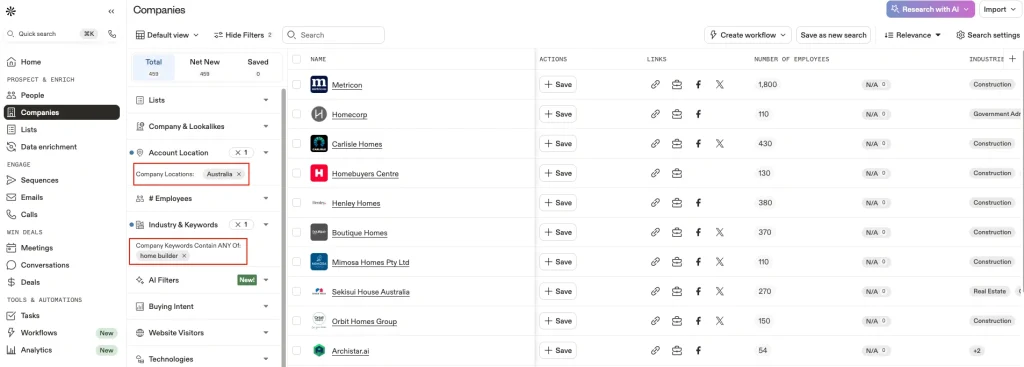
Try Apollo [Sign Up Here]—a powerful email marketing tool with an extensive database that lets you easily filter by industry, company, and job role to uncover professional email addresses and phone numbers. New users get 100 free credits to start.
Below is a demo of finding target leads in Apollo:
Below is a demonstration of using Apollo to find target companies:
For a complete step-by-step guide on using this tool, check out our blog post: Ultimate Lead Generation with Apollo Email Marketing
Create an Email Marketing Workflow
After gathering your target customer email addresses, you need to create an email marketing workflow to automatically send emails to your potential clients.
This email sequence should be capped at 3 emails maximum, with these critical requirements:
- The sending email address must go through warm-up
- Email subject lines must avoid strong sales-oriented vocabulary
- Content must not be HTML-only – include plain text portions
- Delivery timing must align with the recipient’s local business hours (since these are work emails)
- Reasonable intervals between each email
- And other important details
For how to create email workflows, you can also refer to the blog post: ‘Ultimate Lead Generation with Apollo Email Marketing‘.
Whether you want to nurture leads slowly through content subscriptions or reach potential buyers quickly via cold outreach, email marketing is a worthwhile long-term channel. It’s low-cost, high-return, and keeps control firmly in your hands. With the right approach, even complete beginners can use email marketing to move their first growth lever. Start today by setting goals, choosing tools, and building signup forms!