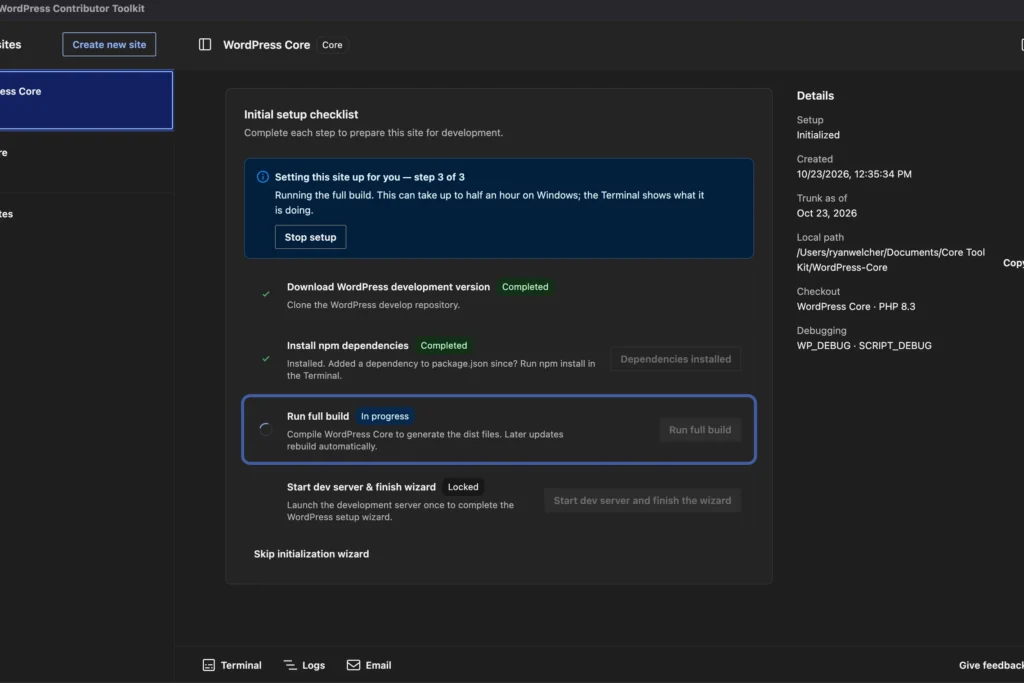
WordPress Contributor Toolkit v2.0.0 ships with a WordPress Design System interface, settings dialog, dark theme, and ten language translations. Here's why a contributor onboarding tool matters to anyone running a WordPress site.
WordPress Contributor Toolkit v2.0.0 is out, and the headline changes are cosmetic and linguistic rather than functional: a rebuilt interface on the WordPress Design System, a settings dialog, a dark theme, and translations into ten languages. The toolkit exists to strip friction out of the path from “interested in contributing” to “actually contributing,” and this release is aimed squarely at the front of that funnel.
What actually changed in 2.0
The release notes describe a full interface rebuild rather than a patch. The new UI is built on the WordPress Design System, which is the same component language now spreading across WordPress admin surfaces. That matters more than it sounds: a contributor tool that looks and behaves like the rest of WordPress lowers the cost of learning it, and it gives the project one fewer bespoke interface to maintain.
The additions, plainly:
- A settings dialog, so configuration no longer lives in scattered places.
- A dark theme, which is table stakes for developer-facing tooling in 2026.
- Translations into ten languages.
The translation work is the most consequential item on that list. Contributor onboarding material has historically been English-first, which quietly narrows who gets through the door. Ten languages is not full coverage, but it moves the tool from “accessible if you read English” to “accessible if you read one of eleven languages.”
Why a contributor tool is worth a site owner’s attention
If you run a WordPress site and have never filed a patch, your instinct is probably to file this under “not for me.” I’d push back on that. The contributor pipeline is the supply chain for everything you depend on: core, the plugin directory, theme review, documentation, translation. A tool that reduces friction at the entry point is an investment in the volume and diversity of people who eventually touch the code your site runs on.
There’s a narrower argument too. The WordPress Design System showing up in a contributor-facing app is a signal about where the project’s interface conventions are heading. Developers building admin UIs for clients should be watching which components get adopted where, because that’s how you find out what will look native in two years and what will look dated.
The honest limits of this release
Nothing here changes what the toolkit does, only how it presents itself and who can read it. A redesign does not fix a broken onboarding flow, and ten languages do not cover the WordPress contributor base, which is genuinely global. The release notes frame the toolkit’s purpose as removing friction for contributors; whether a new coat of paint moves the number of first-time contributors is an open question that no changelog can answer.
I’d also flag the dark theme and settings dialog as the kind of features that get announced loudly and matter quietly. They’re good. They’re also the sort of thing that should have existed already, and their absence until now says something about how much attention contributor tooling has historically received relative to core and the block editor.
What to watch next
Two things. First, whether the ten-language list grows, and whether the project publishes anything about contributor demographics or first-patch conversion after this release. Without that, “we translated it” is a claim rather than a result. Second, whether the Design System migration here becomes the template for other make.wordpress.org tooling. If it does, the contributor experience starts to look coherent instead of like a collection of one-off apps.
For most site owners, the practical action is zero. For anyone who has been meaning to get involved and bounced off the tooling, this is the release that removes the excuse.
Source: WordPress.org