Technical Article & Architecture Insights

Engineering-led notes on AI-native web reconstruction, GEO search optimization, automated email systems, and traffic analytics.

Finding YouTube creators to work with takes forever. I’m building my own automated pipeline

Finding YouTube creators to work with manually is slow and inconsistent. This post lays out a self-built automation pipeline: combine keywords with scenario verbs to search channels, batch-fetch them through the YouTube API, score and rank creators with your own metrics, dig out emails from channel info and websites, reach out one by one with an email prospecting system, and hand replies to a human for negotiation.

Automated YouTube creator outreach pipeline: keyword combos to agent fetch, score and rank, email outreach

All articles

38 articles

How to build a WordPress website that works natively with AI agents

Generating a page with an agent is easy; maintaining a whole WordPress site with one is a different problem. This post turns the process into a repeatable workflow: prepare staging, set up the project workspace and AGENTS.md context, build the design system, review locally, engineer the theme, configure SEO and structured data, accept on staging, and ship to production. Eight phases from first server to long-term maintenance, including the release checklist and the maintenance cadence that keeps an agent-maintained site stable.

How to Create a BigQuery Service Account for Your AI Agent

Once Search Console, GA4, and Google Ads data are in BigQuery, an AI Agent on a VPS needs a machine identity to read it. This guide covers confirming the BigQuery API, creating a Service Account, granting the minimum roles, generating a JSON Key, and verifying access with a Python script.

How to set up HTTP security headers on Cloudflare without touching your code

Security headers are HTTP response headers that make the browser load your site more safely, blocking clickjacking, MIME sniffing, and other common attacks without touching your code. This post covers the six most common headers (HSTS, X-Frame-Options, CSP, and more), then walks through the Cloudflare setup: managed security headers, a custom response header transform rule with Set Static, and verification with SecurityHeaders.com.

Is Your Brand Missing From AI Search? I’m Building My Own Visibility Monitor

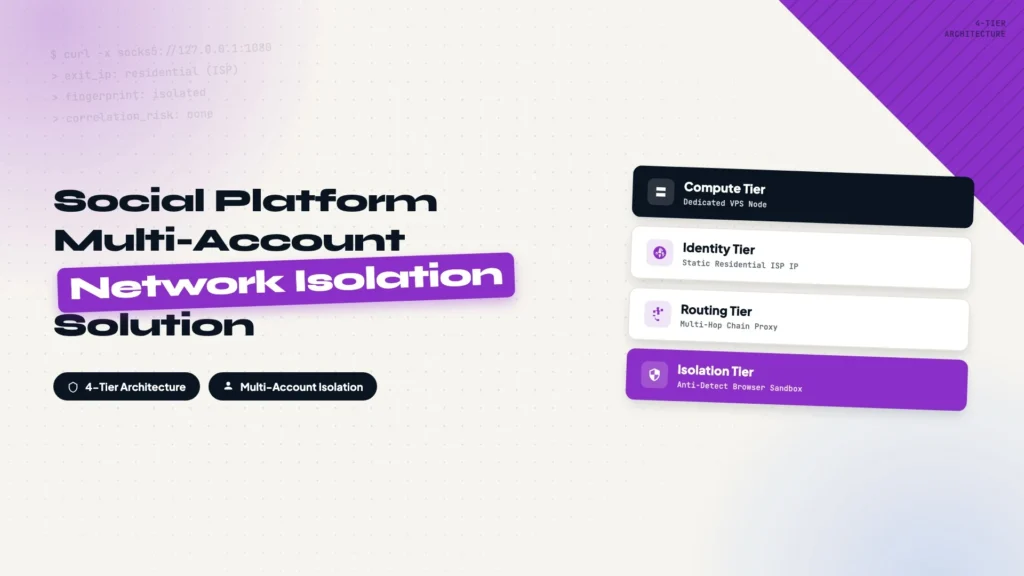
More people discover brands through AI chat answers than ever, but tracking whether your brand shows up there is expensive with off-the-shelf tools. This post lays out a DIY concept: accounts across ChatGPT, Perplexity, Gemini, and Claude Code, an AdsPower fingerprint browser to keep them isolated, daily batch questions that never mention your brand, and entity extraction from the answers to score your visibility over time.

How to install Codex CLI on macOS, Linux, and Windows

A step-by-step guide to installing OpenAI Codex CLI: check the system requirements (macOS, Linux, WSL2), pick one of four install methods (official script, npm, Homebrew, or GitHub release), run the installer, sign in with your ChatGPT account, then verify with codex --version and a simple first task. Every step includes a copy-ready command.

How to Export Google Ads Data to BigQuery

Google Ads reports are restrictive for long-term analysis. Exporting the data to BigQuery lets you join ad spend with search and behavior data using SQL. This guide covers confirming the API, creating the transfer, configuring schedule and a service account, and verifying the first run.

How to Export GA4 Data to BigQuery

GA4 reports limit your analysis options. Exporting the data to BigQuery lets you query every event with SQL. This guide covers confirming the GA4 property, creating the BigQuery Link, choosing Daily export, and verifying that events_ tables arrive.

How to Export Google Search Console Data to BigQuery

Search Console shows at most 1,000 rows and aggregates data beyond a point. Exporting it to BigQuery lets you run full SQL analysis. This guide covers creating a Cloud project, enabling APIs, creating a dataset, starting Bulk Data Export, and fixing the Missing permissions error.

How to Create a Subdomain in Cloudflare

A subdomain is just a DNS record. This guide walks through creating one in Cloudflare: add an A record, point the subdomain at your server IP, save, and verify. The same steps apply in other DNS control panels.

How to Subscribe to ChatGPT and Claude Code Without a Credit Card

Create a U.S. Apple Account, top up with Apple Gift Cards, and pay from the balance inside the iOS apps. This is how to subscribe to ChatGPT Plus or Claude Pro without a credit card, and the same workflow covers Claude Code.

How to Set Up Proxy for Global Social Media Platforms

TikTok, Facebook, or Instagram operations keep hitting slow speeds and bans? This guide covers the dual-hop setup: a CN2 GIA entry node plus a local ISP residential exit IP, with Shadowrocket and Xray configuration, step by step.

Bandwagon CN2 Gia Vps Setting Guideline

A must-read for cross-border e-commerce and foreign trade: build a dedicated high-speed overseas node with a CN2 GIA VPS. From purchasing the VPS, KiwiVM console, FinalShell connection, domain SSL, Xray panel to BBR acceleration, seven steps with full screenshots.

15 Tricks to Optimize WordPress Website Speed

From the five core PageSpeed metrics (FCP, LCP, TBT, CLS, SI) to 15 practical speed tricks for WordPress: server choice, plugin discipline, image compression and WebP, object cache, CDN, lazy loading, and page cache.

How to Block IP Address in WordPress?

Block country IPs in WordPress with the .htaccess method: download an IP list from IP2Location, paste it into .htaccess on Hostinger, and deny access by country. Works on any Apache-based host.

How to Register Domain and Set Up DNS on Namesilo Namecheap and Godaddy?

Register a domain and set up DNS on NameSilo, Namecheap, and GoDaddy. Covers A records and custom nameservers, with screenshots and a comparison table to help you point your domain at your host.

How to Install Elementor: Free vs Pro, Features, and Setup Guide

What Elementor is, a detailed free vs Pro comparison (Theme Builder, Popup Builder, Form Builder, WooCommerce Builder, dynamic content), and step-by-step install instructions for both the free plugin and Elementor Pro via ZIP upload.

How to Install Hello Elementor Theme: Your First Step to Building with Elementor

Why Hello Elementor wins on compatibility and performance, how to install and activate it, delete default themes, and set up a child theme to protect your customizations from future updates.

Hostinger WordPress Hosting Guide: Which Plan Is Right for You?

A complete guide to Hostinger's WordPress hosting plans: Premium, Business + AI, and Cloud Startup + AI. Compare features, pricing, and performance, then choose by website count, site type, and technical needs. Includes an exclusive 20% discount link.

How to Buy Hostinger and Set Up WordPress: A Complete Step-by-Step Guide

Buy the Hostinger Business + AI plan ($3.99/mo for 48 months + 3 months free), register a $0.01 domain, install WordPress with one click, run the initial setup, and pick a theme. Zero to a live site in 30 minutes, with an exclusive 20% discount link.

How to Find Keywords for SEO?

Using a cosmetics wholesale B2B site as the example, this article explains how to find SEO keywords through competitors: understanding the four keyword intents, searching for competitor keywords, analyzing traffic and keywords with SEMrush, filtering by KD and traffic, and exporting the list across more competitors.

How to Install Google Tag Manager on Your Website?

This article walks through installing and configuring Google Tag Manager: creating an account, adding the two code snippets to your site (with WPCode on WordPress), configuring the GA4 tag, verifying data with Tag Assistant, and submitting the configuration for publishing, in 27 steps with screenshots.

How to Set up GA4 Data Stream for Your Website?

This article shows how to create a GA4 data stream for your website: from logging in to Google Analytics and creating an account and property, to choosing an industry and setting up the web data stream, in 11 steps with screenshots. Once done, your site starts collecting user behavior data.

15 Google Search Operators and Their Uses

The 15 most useful Google search operators explained one by one: site, intitle, inurl, related, filetype, OR, AND, AROUND, and more. Each operator comes with a real search example and a plain-language explanation of the results, for checking index status, competitor analysis, and keyword research.

How to Connect Your Website to Google Search Console and Submit a Sitemap?

This guide walks through connecting your website to Google Search Console and submitting a sitemap: preparing a Google account, adding your site, verifying domain ownership by adding a TXT record in Hostinger's DNS Zone Editor, submitting the sitemap, and checking discovered pages. Every step includes a screenshot.

What Are SPF, DKIM, and DMARC? How to Configure Email Authentication in Cloudflare

SPF, DKIM, and DMARC are the three DNS-based checks that prove your sending domain is legitimate. This article explains what each record does, how to add the TXT or CNAME records in Cloudflare DNS, and how to verify them by sending a test email to Gmail and looking for spf=pass, dkim=pass, and dmarc=pass.

What are IMAP, POP, and SMTP?

This article explains what IMAP, POP3, and SMTP do: which protocols receive email, which one sends it, and whether messages stay on the server or download to your device. It also includes an IMAP/SMTP server and port table for common providers, so you can copy the values when linking a mailbox.

How to set up Apollo email marketing from signup to automated sequences

This guide walks through the complete Apollo email marketing setup: registering an account, connecting a sending mailbox, warming it up, verifying domain authentication records, filtering for target prospects, and building a five-step cold email + LinkedIn sequence. Every step includes a screenshot, so you can follow along even on your first attempt. The flow ends by connecting your contact list to the sequence so the whole system runs on its own.

Why lower your DNS TTL to 300 before a migration?

TTL (Time To Live) controls how long a DNS record stays cached, which sets how fast a nameserver switch takes effect across the internet. This short post explains what TTL is, why you should lower it to 300 a day or two before a DNS migration, how to make the change, and when to raise it back afterwards.

I use Gmail Authentication-Results to tell whether a test email will hit spam

Send a test email to your Gmail account and read the Authentication-Results header to check whether SPF, DKIM, and DMARC all pass. This post explains how to read each of the three results, why everything can pass and mail still lands in spam, and how Authentication-Results compares with Google Postmaster Tools. It also covers the best practices that improve inbox rates once the authentication layer is solid, in a practical order.

I cut my landing page build time to 30 minutes with Codex and Claude Code

Building a landing page in Elementor used to take me half a day. With Codex and Claude Code, the same page now takes under 30 minutes. This post breaks down the four-step workflow: AI generates HTML from Markdown, inline styles get extracted into a standalone CSS file, SEO metadata and Schema are generated in the same pass, and everything deploys to WordPress with AIOSEO filled in automatically via a small mu-plugin. It also covers the manual versus automated split and an efficiency comparison against drag-and-drop editors.

How to Buy an IPRoyal ISP IP and Use It With Shadowrocket

This guide explains how to buy an IPRoyal ISP IP and configure it in Shadowrocket for a stable long-term network exit.

How to Reduce Claude Code Account Risk

This is a practical review of the account, Apple ID, device, payment, language, timezone, and ISP-IP setup I use to keep Claude Code stable.

How to Install Claude Code on macOS, Windows, and Linux

This guide covers Claude Code prerequisites, macOS, Windows, Linux, and WSL installation options, plus how to verify the setup with claude --version and claude doctor.

Why Experienced Developers Prefer Hosting DNS on Cloudflare

Experienced developers don't always register domains at Cloudflare, but they often move their DNS there. This post explains the difference between domain registration and DNS hosting, why Cloudflare became the default choice for developers (anycast speed, a cleaner management panel, and CDN/SSL/security integration), and how to migrate DNS records step by step without breaking email. It also covers lowering TTL before the switch, DNSSEC, and the most common migration questions.

How To Improve Website Performance Using Cloudflare R2 Object Storage For Free

This guide solves the problem of image-heavy WordPress sites slowing down origin servers by moving image delivery to Cloudflare R2, serving assets through a Worker, and applying long-term CDN caching to reduce load and improve performance.

ChatGPT Writing: How to Write AI-Friendly Blogs with ChatGPT

This guide solves the problem of using ChatGPT without producing shallow AI content by showing a practical workflow for topic selection, keyword planning, source gathering, article structure, prompt control, and final SEO optimization.

What Is GEO and How to Do GEO?

SEO is gradually fading, and GEO is emerging as a new optimization strategy. In the current AI search environment, users can access information directly without needing to click, making GEO the future of search visibility. Learn what GEO is and how to implement it step by step.

How to Deploy a WordPress website Using Hostinger?

Deploying a WordPress website using Hostinger is a straightforward process, perfect for beginners. Start by purchasing a domain and choosing a Hostinger hosting plan, such as the Business plan for optimal features. After setting up your account and completing payment, log in to Hostinger and begin the website setup. Select WordPress as your platform, create a username and password, and choose your website type. Install WordPress and configure DNS settings through your domain registrar, like Alibaba Cloud. Finally, block search engines from indexing your unfinished site by uploading a robots.txt file to your server. This ensures a smooth start to your WordPress site deployment.