A cross-border business needs SEO decisions built on its own data, not on generic industry reports. This article documents how we built an SEO Copilot: pulling Search Console, GA4, Google Ads and WordPress data into BigQuery, using SQL and rules to surface first-page opportunities, high-impression low-click pages, keyword cannibalization and thin content, then letting an AI agent explain each finding and turn it into a task. It covers the infrastructure, the data warehouse, the diagnosis models and the scheduled run that produces a report every morning.
Why build your own SEO tool?
There is no shortage of SEO tools. Ahrefs, Semrush, Screaming Frog, plus the wave of AI SEO assistants that appeared over the past two years, can all help a business with keyword research, competitor analysis and site audits.
But after running cross-border business websites for a long time, I kept running into the same problem: general SEO tools solve analysis at the industry level, while a business actually needs a decision system built on its own data.
Semrush can tell you how many searches a keyword gets worldwide, which competitors are ranking and roughly how much organic traffic a site might attract. What it cannot answer are the questions a business cares about every day:
- Why did impressions on a product page go up recently while its click-through rate keeps falling?
- Which keywords are already on page two of Google and need one more push to reach page one?
- Which pages on the site are competing for the same keyword?
- Did last month’s content edits actually improve rankings and conversions?
- Which pages pull in a lot of organic traffic but produce no business value?
The answers to these questions are not in third-party SEO SaaS platforms. They sit inside the company’s own data assets: Google Search Console, Google Analytics 4, Google Ads, the WordPress content database, and the company’s own product and business information. That data is unique to every business.
For an SEO software platform, “what is the global search volume for this keyword?” is a generic question. For a cross-border B2B company, “is this keyword worth investing content resources in?” depends on current ranking, page type, product fit, user behavior and conversion data, and only the company has that information.
So I started thinking: if all this scattered data could be connected and then handed to an AI Agent for automatic analysis, could I build an SEO Copilot that genuinely belongs to the business?
Making that happen used to be hard. You needed SEO expertise, data analysis skills, database skills, backend development, frontend development and server deployment at the same time. For most SEO specialists, marketers and even business owners, that is close to impossible. Most companies end up exporting Excel files on a schedule, cleaning the data by hand, and guessing the next optimization move from experience.
With AI Coding Agents, this has started to change. A person who understands the business no longer needs to be a professional programmer to take part in building a complex system. You define the business goals, map out the data sources and judge whether the analysis results make sense; the Agent handles the data processing, backend development, frontend interface, automation and deployment.
This article walks through building an SEO Copilot like that from zero to one. It is not a simple data dashboard, but an AI driven SEO system that collects SEO data automatically, analyzes site health, finds optimization opportunities, generates action recommendations and keeps tracking the results.
NOTE
To protect client data privacy, every site name, keyword, page URL and business figure in this article has been generalized. The architecture and the development process match the real project.
Before you start: what should SEO Copilot actually solve?
A common mistake when building AI tools is opening Claude Code or Codex and typing “build me an SEO tool.” A few minutes later a dashboard with a clean interface shows up, but it may not solve the core problem in SEO work at all. The most important part of an SEO system is not the interface, it is whether it helps the business make correct decisions. So before writing any code, define what this SEO Copilot actually needs to solve.
1. Monitoring overall SEO health
The first requirement is understanding the site’s overall health. The system needs to track organic search impressions, clicks, CTR, average position and organic conversion trends over time, with Google Search Console and Google Analytics 4 as the sources.
The end goal is not to display more numbers, but to answer one question: “over the past period, is the site’s SEO performance improving or getting worse?”
2. Automatically finding keyword growth opportunities
The keywords most worth attention in SEO are usually not brand new ones with no rankings at all, but the ones already close to page one that need one more push.
For example, a commercial keyword:
Example Keyword
Average Position: 13
Impressions (last 90 days): 15000
Clicks (last 90 days): 200
This tells us Google already considers the page relevant to the search intent. Compared with competing for a brand new keyword from scratch, these keywords usually have higher optimization value. SEO Copilot therefore needs to automatically surface keywords ranked 8 to 20, keywords with rising impressions, and keywords connected to the business, then turn them into a “worth optimizing now” task list.
3. Finding page-level SEO problems
Keywords are only the entry point. What actually affects SEO results is the page. The system needs to identify three types of problem pages.
High impressions, low clicks
A page gets strong impressions and ranks decently, but its CTR is clearly below what the ranking should produce. Typical causes are an unappealing title, a meta description that does not match search intent, or a mismatch between the page and the intent Google inferred.
Traffic but no conversions
A page receives a healthy amount of organic traffic each month and users stay on it, but no business action comes out of it. Usually the fix involves adjusting the CTA, improving the page structure, or adding related product content.
Thin content
The system needs to identify pages with too little content, missing topic coverage, or a mismatch with search intent.
4. Finding keyword cannibalization
Many business sites end up with several pages competing for the same keyword. A product page, a blog post and a resource page all try to rank for the same term, so Google is unsure which page is the main answer, which is Keyword Cannibalization.
SEO Copilot needs to analyze which keywords map to multiple URLs, which page performs best, whether content should be merged, and whether a page’s positioning needs to change.
5. Generating SEO recommendations automatically
Finding problems is not the end goal. The valuable part is telling the operator what to do next.
For example the system finds:
Page: /example-product-guide/
Keyword: Example Keyword
Position: 12
CTR: 0.8%
AI output:
- Rewrite the title to improve click appeal
- Add an FAQ around related questions
- Add case studies and use scenarios
- Add internal links
That is how SEO work moves from manual analysis to a system that hands out optimization tasks.
6. Closing the SEO optimization loop
The traditional SEO process is: find a problem, edit the page, wait for results. Its biggest weakness is that nobody records why the change was made or whether it worked. SEO Copilot builds a longer chain:
The SEO optimization loop
Find the problem
→
Generate a suggestion
→
Apply the change
→
Log the change date
→
Measure the effect
The result is a data driven SEO improvement cycle.
What infrastructure does SEO Copilot need?
Once the goals are clear, the next step is preparing the development environment. The system consists of an AI Agent, the data sources, a data warehouse and a server environment.
1. AI Coding Agent
This project uses an AI Coding Agent as the main development tool, meaning something like Claude Code or OpenAI Codex. The install steps for the former are in How to Install Claude Code on macOS, Windows, and Linux, and Codex is covered in How to install Codex CLI on macOS, Linux, and Windows. It takes on project planning, code generation, data structure design, debugging and deployment support.
Keep in mind that an Agent is not an automatic development machine. Its main value is turning your business idea into a working system quickly. You are responsible for deciding “what to do,” the Agent handles “how to implement it.” If you have not subscribed yet, this article covers it: How to Subscribe to ChatGPT and Claude Code Without a Credit Card.
2. Google Search Console
Google Search Console is Google’s own search analytics tool for websites. It shows which queries users typed, how many impressions and clicks a page received, plus CTR and average position, which makes it the most important first-party data for SEO.
The limitation is obvious: the web interface is built for manual inspection, and the moment you want a trend comparison longer than a few months, or want to look at search performance next to conversion data, the data has to move into BigQuery. The first half, connecting the site to Search Console and submitting the sitemap, is covered in How to Connect Your Website to Google Search Console and Submit a Sitemap. The second half, exporting search data to BigQuery, is in How to Export Google Search Console Data to BigQuery.
3. Google Analytics 4
GA4 provides what happens after a user arrives on the site: sessions, acquisition sources, page behavior and conversion events. Put simply, GSC tells you how users find the site and GA4 tells you whether that visit produced value.
The data preparation path is similar to GSC. First set up the data stream, covered in How to Set up GA4 Data Stream for Your Website, then export the event data to BigQuery as described in How to Export GA4 Data to BigQuery.
4. Google Ads
Google Ads data supplements commercial keyword analysis. Ad performance tells you which keywords carry commercial value, and combining it with organic ranking data reveals which paid keywords deserve a long-term SEO investment. The export process is covered in How to Export Google Ads Data to BigQuery.
5. Google BigQuery
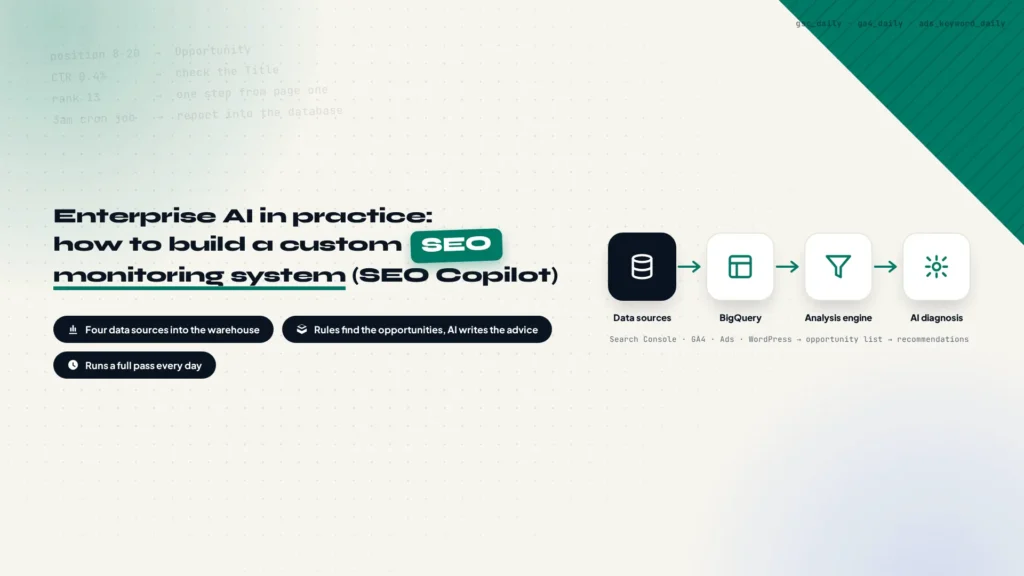
BigQuery is the data foundation of the whole SEO Copilot. GSC, GA4 and Google Ads produce data, BigQuery stores and analyzes it. The system flow looks like this:
From data sources to SEO recommendations
Google Search Console
Google Analytics 4
Google Ads
Google BigQuery
Stores and manages all SEO data
↓
SEO Analysis Engine
Turns rules into a shortlist of issues
↓
AI Agent
Explains causes and writes recommendations
↓
SEO Recommendation
An action list for the operator
Why not Excel? Because SEO data is long-cycle, multi-source and updated frequently, which calls for an actual data warehouse.
Once the data is in BigQuery, the Agent also needs to read it on its own. That means creating a dedicated Service Account with query permissions, and the steps are in How to Create a BigQuery Service Account for Your AI Agent.
6. Extra data assets SEO Copilot needs
Google Search Console, Google Analytics 4, Google Ads and BigQuery all answer the same question: what is happening on your own site. A Copilot that supports business SEO decisions needs three more kinds of data: your own target keywords, how competitors’ keywords perform, and the content the site actually has today. SEO decisions are not only about how your site performs. They are also about what the market is doing and what content you already own.
Three data assets that are easy to overlook
Google Ads keyword structure
Commercial terms the business validated
Competitor keyword data
Rankings and traffic from SEMrush
Site content snapshot
Pulled through the WordPress REST API
Google BigQuery
Joined with the rest of the data layer
Google Ads data is not only useful for judging ad performance. It is also where your commercial keywords come from. When a company keeps bidding on the same set of terms, those terms have usually been validated by the business and bring inquiries or orders. Put the bid keywords, ad group structure, click data and conversion data next to organic search data, and the system can spot opportunities that neither report shows on its own. If a keyword keeps converting through ads while its organic position sits on page two, the system flags it as a term worth a long-term SEO push.
One caveat. The Google Ads data that lands in BigQuery is shaped for ad performance analysis, while the ad group keyword structure your team maintains by hand is a separate thing that is better stored as its own source. With both in place, the system knows which keywords bring traffic and which ones carry commercial value.
Competitor keyword data comes from an external SEO platform such as SEMrush, which can sync each competitor’s ranking keywords, the pages they rank with, position changes and estimated traffic on a schedule. This data answers questions your own dashboards cannot: which new opportunities a competitor picked up recently, which topics are turning into industry trends, and which terms are worth targeting early. If the platform exposes an API, a scheduled job can handle the whole sync with no manual exports. A lighter tool such as KWFinder covers the basic keyword data if you want to keep the cost down.
The third asset is a snapshot of your own content. Ranking data tells you a page was found, not what the page says, so the system needs to pull the site’s content and store it. On WordPress you can call the REST API directly to fetch pages, posts, products and categories, saving the URL, title, meta information, body content, last update time and content length. Once a week is enough. With that snapshot in place, the AI can judge whether a page covers its search intent, whether it is thin content, and whether it needs an update.
All three belong in the same recurring update flow as everything else rather than a one-off import. Every week the system refreshes the search and behavior data in BigQuery, syncs competitor keywords, updates the content snapshot, then runs the analysis and writes the recommendations.
The weekly update flow
Weekly job
Triggered on a schedule
↓
Refresh BigQuery data
Search and behavior data updated
↓
Sync competitor keywords
Rankings, pages and estimated traffic
↓
Update content snapshot
Latest version of every page
↓
Run the SEO analysis
Models filter opportunities and problems
↓
Generate recommendations
A list a human can act on
After a few months, what accumulates becomes more useful than any single report: search data, behavior data, commercial keywords, competitor movements and content assets all sit in one warehouse, so every analysis sees your own business, the market and the content you already have at the same time. That is the practical difference between a self-built system and an off-the-shelf SEO tool. A tool hands you industry data anyone can buy. Your own system derives its recommendations from your data.
7. VPS server
To keep the system running, it needs a server hosting the backend services, database, dashboard and scheduled tasks. You can use a cloud instance, a VPS or run everything in Docker. For an individual developer or a small team, a low-cost VPS is enough for this type of AI application.
The system calls Google’s APIs continuously, so running it on a node in the same region as those services saves a lot of network troubleshooting. I used an overseas VPS for exactly that reason, and it handles the scheduled jobs and the dashboard without trouble.
Don’t let the Agent write code first, make it understand the project
This is the most important step in the whole development process. Many AI projects fail not because the Agent cannot write code, but because the Agent has no idea what problem it is supposed to solve.
Tell an Agent “build an SEO dashboard” and it may produce a few stat cards, a couple of trend charts and a good looking homepage, but it does not know which metrics matter or which analysis has business value. The correct order is to establish project context first.
The traditional development flow
Requirements move through a product manager, design, development and finally testing:
Traditional development
Requirements
→
Product manager
→
Design
→
Development
→
Testing
The Agent development flow
Now the flow starts from the business goal, turns it into project documents the Agent can read, then generates a plan and moves into implementation:
Agent development
Business goal
→
Project documents
→
Agent understands
→
Plan generated
→
Implementation
Before development starts, prepare the project documents. For example:
project/
├── README.md
├── BUSINESS.md
├── DATA_SCHEMA.md
├── PLAN.md
├── TODO.md
└── CLAUDE.md
BUSINESS.md: why the project exists
It records the business type, the SEO goal, user needs and the value the system delivers. For example: this is an SEO data analysis system for a cross-border business website, used to find keyword opportunities and page optimization directions automatically.
DATA_SCHEMA.md: what the data looks like
It records data sources, table structures and field relationships. For example, the Search Console data contains these fields:
Search Console
keyword
click
impression
position
CTR
PLAN.md: the build order
For example:
- Phase 1: data connections
- Phase 2: database design
- Phase 3: analysis modules
- Phase 4: dashboard
- Phase 5: automated reporting
CLAUDE.md: the Agent’s working rules
It tells the Agent the project conventions, technical requirements, coding style and things to watch out for. With that in place the Agent stops being a one-off code generator and becomes an engineering assistant that takes part in the project over time.
The next chapter moves into the actual system design phase: how to let the Agent design the SEO Copilot architecture, and how to build the data warehouse.
Let the Agent be the product manager: design the system first, then build
Once the groundwork is done, the next step is not asking the Agent to write code immediately. Many AI projects fail not because of technical problems, but because product design was never finished before development. In the past a product manager handled defining business goals, breaking down feature requirements, designing user flows and setting acceptance criteria. In the Agent development model that work still exists, only the executor changed: you need to get the business logic straight first so the Agent can understand the project.
1. From feature requests to system capabilities
At the start I did not tell the Agent “build me an SEO dashboard.” I broke down which capabilities the system needs instead. SEO Copilot splits into six core modules, each handling a different task.
The six core modules of SEO Copilot
Data collection layer
It gathers the raw data, and there are four sources:
| Source | What it provides |
|---|---|
| Google Search Console | Query, click, impression, CTR, position |
| Google Analytics 4 | User behavior, page views, conversion events |
| Google Ads | Paid keywords, cost per click, commercial value reference |
| WordPress database | Page information, content structure, publish date, categories |
The goal of this layer is not analysis, only making sure all the data enters the system reliably.
Data warehouse layer
This layer stores and organizes the data. Why does it need its own layer? Because the data structures of the platforms are completely different: Search Console focuses on search performance, GA4 on user behavior, WordPress on content. If AI reads those tables directly, it has to work out again every time where the data lives and what each field means, which is slow. So a unified data layer comes first.
SEO analysis engine
This is the core of the system, and it turns raw data into SEO insight. A raw row is just keyword, position, impression and click; after analysis it becomes a task with a cause and a recommendation, such as an opportunity type of “page one promotion,” a cause of ranking already on page two with rising impressions and low CTR, and recommendations to optimize the title, expand the content and add internal links.
AI diagnosis layer
This layer solves the problem that traditional tools stop at “finding the issue.” A traditional tool says “this page has a low CTR,” but what the business needs is “why is it low, and what should we do.” So an LLM comes in here, combining page content, search terms, ranking and user behavior to produce natural language recommendations.
Dashboard layer
The dashboard is not for showing more data either, it is for lowering decision cost. The key screens are organized around SEO health score, keyword opportunities, page diagnosis and content suggestions, answering the question “what should I do today?”
2. Define the data flow before the pages
Many people start designing the interface when they build a dashboard, which is the wrong order for SEO Copilot. The right sequence is to start from the business question, then decide what data is needed, how it is calculated and how it is analyzed, and only then decide how to display it.
Define the data flow first
Business question
↓
What data is needed
↓
How it is calculated
↓
How it is analyzed
↓
How it is displayed
A concrete example: the question is “which keywords have a chance of reaching page one?” The data needed is keyword, position, impression, click and CTR, the analysis logic is position between 8 and 20 with impressions trending up and commercial relevance, and the output is an optimization list. Only at that point does the dashboard come into play.
3. Give the Agent project context
During actual development I ask the Agent to read these files first:
PROJECT_CONTEXT.md
DATA_SCHEMA.md
FEATURE_LIST.md
TECH_STACK.md
They work as the project manual. PROJECT_CONTEXT.md tells the Agent what the project is, DATA_SCHEMA.md tells it how the data is organized, FEATURE_LIST.md tells it what the system needs to do, and TECH_STACK.md tells it which technologies are in use. The benefit is that every time the Agent starts, it recovers the project context quickly, which is the main difference between Agent development and an ordinary ChatGPT conversation.
Building the SEO data warehouse: turning scattered data into a business asset
Once the system design is finished, the next step is building the data foundation. The core idea behind SEO Copilot is not letting AI guess, it is letting AI analyze the company’s own data, market data and content assets, so the data warehouse comes first.
1. Why BigQuery is required
The first instinct for most companies doing SEO analysis is exporting to Excel. That works in the short term, but three problems show up later.
Data volume grows
After a site has been running for a few years, Search Console data, GA4 event data and Ads data accumulate every single day, and Excel cannot manage that over time.
Data cannot be joined
To find out whether visits from a keyword led to a conversion, you have to join three pieces of information together, and doing it by hand is painful.
One conversion spans three data sets
Search Console
Keywords
→
GA4
User behavior
→
CRM
Inquiries
No automation
SEO Copilot has to run every day: pulling the latest data in the early hours, updating the database, analyzing the changes and generating a report. That requires structured data. BigQuery therefore becomes the data foundation of the system.
2. The overall SEO data architecture
The data flow starts from the site’s own data plus the three extra assets, converges in BigQuery, passes through the processing layer into the SEO Analysis Database, reaches the AI Agent, and ends as an SEO Report and dashboard.
SEO data architecture
Data from your own site
Search Console
Google Analytics 4
Google Ads
Extra data assets
Ad keyword structure
Competitor keywords
Site content snapshot
Google BigQuery
Single store for raw data
↓
Data processing layer
Cleaning, unified fields, per-source tables
↓
SEO Analysis Database
Where analysis output is stored
↓
AI Agent
Explains causes, writes recommendations
↓
SEO Report / Dashboard
Conclusions for humans
Those sources do not appear in BigQuery by themselves. The three Google products have their own export paths: search data in How to Export Google Search Console Data to BigQuery, GA4 in How to Export GA4 Data to BigQuery, and Google Ads in How to Export Google Ads Data to BigQuery. The ad keyword structure, competitor keywords and content snapshot have no built-in export, so a scheduled job has to sync them, as described in the infrastructure section above.
3. Table design
Do not mix everything into one table. Splitting by source is the least painful approach.
| Table | Fields | What it stores |
|---|---|---|
| gsc_daily | date, query, page, click, impression, ctr, position | Search performance |
| ga4_daily | date, page, session, engagement, conversion | User behavior |
| ads_keyword_daily | date, keyword, click, cost, conversion | Commercial value |
| ads_keyword_structure | keyword, ad_group, business_value | Commercial keyword structure |
| competitor_keywords | date, competitor, keyword, page, position, traffic | Competitive environment |
| pages | url, title, content, category, publish_date | Site content |
4. Why unified fields matter
Field names differ completely across sources. Search Console calls it click, GA4 calls it sessions, WordPress calls it post_status. Hand those tables to AI as they are, and it has to translate fields on every run, which is slow and error-prone. A unified model on top of the analysis layer maps every source to the same naming convention:
page
date
traffic
ranking
conversion
content_quality
With that in place, a single row the SEO Agent reads already contains traffic, ranking, conversion and content quality, and the analysis no longer has to care which table the data came from.
Once the data is in, how do you design the SEO analysis engine?
The data warehouse is only the foundation. What creates value is the analysis logic. The core of SEO Copilot is not the dashboard, it is the SEO Analysis Engine, which turns data into action.
1. Page one opportunity model
The first model looks for keywords that are one step away from page one. The conditions are usually a position between 8 and 20, impressions trending upward, and a query connected to the business. Matching rows are flagged as opportunities.
position: 8-20
impression: trending up
query: commercially relevant
The output is something an operator can act on directly:
Keyword: Example Keyword
Current position: 13
Opportunity: page one
Recommended: expand the page content
add internal links
strengthen E-E-A-T signals
2. High impressions, low clicks model
This is the most common SEO problem. Take one row of data:
impression: 50000
click: 200
CTR: 0.4%
Google is already showing the page widely, but users are not clicking. Possible causes are an unappealing title, a description that does not match intent, or a misread of the search intent. The AI reads the page content and narrows that down to one or two causes, then writes a recommendation.
3. Page conversion model
SEO is not only about traffic. The end goal for a business is usually inquiries, sales leads and orders, so this model joins the whole path together:
Conversion path analysis
SEO Traffic
→
Landing Page
→
User Behavior
→
Conversion
That is how you find which pages bring real commercial value and which ones just look busy.
4. Keyword cannibalization model
The detection logic is not complicated: look for one keyword mapped to several URLs. For example:
keyword: example keyword
URL A: position 8
URL B: position 15
URL C: position 22
The system flags possible page competition and recommends merging the pages, repositioning them, or designating one main target page.
5. Thin content model
SEO Copilot also needs to understand page quality. The checks cover word count, content structure, keyword coverage and internal link count, and the purpose is finding pages that exist but fail to satisfy search intent. The output is a list of content additions.
6. Why the analysis engine matters more than AI
Many people assume AI SEO means calling GPT. It does not. The biggest strength of an LLM is understanding, but it cannot replace data logic. The correct architecture is:
How rules, data and AI divide the work
Structured data
↓
SEO rule analysis
↓
AI understanding and recommendations
↓
Human decision
AI explains, rules discover, data proves. That is also the biggest difference between an enterprise AI application and a plain ChatGPT prompt.
The next chapter moves into how to build an AI SEO diagnosis Agent that generates optimization recommendations automatically, covering how the Agent reads analysis output, how prompts are designed, how the AI understands page context, automated SEO reports, and the weekly and monthly reporting flow.
Getting the AI Agent into SEO analysis: from monitoring to diagnosis
The previous chapters completed the foundation of SEO Copilot: data sources connected, the data warehouse built, SEO analysis rules designed. But at that point the system is still, in essence, an automated data analysis platform. It can tell you which keywords changed position, which pages changed traffic and which metrics look abnormal, but it cannot answer why the problem appeared or what to optimize next. That is where an AI Agent adds value.
The core of SEO Copilot is not wiring GPT into a dashboard. A genuinely useful AI application puts the AI on top of structured data and business logic instead of letting it loose on raw data.
1. Why traditional SEO reports fall short
Most companies produce SEO reports on a schedule, covering organic traffic trends, keyword count changes, page visits and ranking movement. The data itself is fine. The problem is that data does not turn into action by itself.
A report shows a page gained 80% more impressions and 20% more clicks over the past 30 days while CTR dropped. What does that mean? Traffic demand may have risen across the market, the ranking improvement may have brought more impressions than the page can convert, or the title and intent match may be weak. A traditional SEO specialist has to run another round of analysis on top of that.
SEO Copilot takes on the whole stretch from spotting the change in data to understanding why it happened to proposing an optimization.
2. How the SEO Agent works
The SEO Agent does not read every piece of site data and improvise. A more sensible architecture is the chain below:
The SEO Agent pipeline
Data warehouse
History and unified fields
↓
SEO analysis models
Rules run first
↓
Anomaly and opportunity detection
Narrow down to the rows worth reading
↓
AI Agent reads the context
Page content and business background
↓
Optimization recommendations
Cause, priority, action
↓
Report output
Into the dashboard and email
In this chain the program handles data calculation, condition checks and metric filtering, while the AI handles reading context, explaining causes and writing recommendations. That combination is more reliable than leaning on an LLM alone, because the verifiable part of the work always stays inside the program.
3. What context the AI Agent needs
An SEO Agent that only knows “keyword Example Keyword, position 12” cannot produce a good recommendation, because SEO judgment depends on context. Analyzing a page requires four kinds of information.
The first is page information: URL, title, meta description, page body and page type. Page type is often overlooked, yet a product page, a category page, a blog post and a technical resource page all need completely different optimization strategies. The same position 12 result means the product page needs specifications and an inquiry entry point, while the blog post needs depth and internal links.
The second is search performance data: queries, clicks, impressions, CTR, average position and historical trend. Those numbers tell the AI how Google evaluates the page. The third is user behavior data: sessions, engagement, time on page and conversion events, which tell the AI whether users actually find the page useful.
The fourth is business background, the part most general SEO tools miss. The same keyword may only represent traffic value for a news site, while for a B2B company it may represent real purchase intent. The AI has to understand that different business goals lead to different SEO conclusions.
4. SEO diagnosis model design
Inside SEO Copilot the AI analysis splits into several independent diagnosis models. They share the same context and differ only in filtering conditions and output format. These five were the first to work reliably.
Model 1: keyword opportunity analysis
The goal is finding the keywords most worth investing in. The system pulls out keywords around position 14 with rising impressions and low CTR, and the AI judges the search intent behind them and whether the current page content can serve it. Its output usually has three parts: the evidence that Google already accepts the page as relevant, the gaps in content depth and topic coverage, and concrete actions such as expanding the content, covering related topics, improving the page structure and adding internal links.
Model 2: page one opportunity analysis
This model handles pages ranked between 11 and 20 with rising impressions. The system marks them as potential growth pages and the AI assigns priority. Priority is not only about the ranking number: it also depends on whether the page targets a core business keyword, how expensive the change is, and whether existing internal links can carry some of the work.
Model 3: high impressions, low clicks analysis
This is the most common problem on business sites and the place where the AI adds the most direct value. After reading the page content and the search result snippet, it narrows the possible causes to one or two, for example noticing that the title is missing a modifier users actually search for, or that the description talks about specifications while users want selection advice. If the site runs on WordPress, this kind of bulk title and meta description editing can be handled with the All In One SEO plugin, and its official MCP support makes batch updates possible.
Model 4: keyword cannibalization analysis
When several pages rank for the same keyword, the AI has to answer which page ranks best, which one earns the most clicks and which content matches intent most closely, then recommend merging pages, repositioning them or setting one main target page. That judgment involves content semantics, which rules alone struggle to handle.
Model 5: content quality analysis
Ranking movement is the result; content is the cause. This model combines page length, content structure, topic coverage and internal links to identify thin pages, outdated pages and pages that do not cover the intent well enough. The output is not a score, it is a list of additions that can be scheduled.
5. Why the SEO Agent is not just a GPT call
Many people think of AI SEO as calling a large model and typing “optimize my page.” Enterprise AI applications do not work that way. The effective architecture runs business data through the analysis logic first, hands it to the AI to understand, and leaves the decision to a human. The AI’s strength is language; the data rules set the direction.
The order enterprise AI applications follow
Business data
→
Analysis logic
→
AI understanding
→
Human decision
So SEO Copilot does not replace SEO, it amplifies the judgment of an SEO specialist.
Building the automation layer of SEO Copilot
Once the data, analysis and AI diagnosis layers are in place, the next step is keeping the system running. The biggest SEO problem is usually not a lack of analysis, it is the inability to keep going.
1. Why automation is necessary
Most SEO programs end the same way: phase one builds a keyword list, phase two optimizes pages, phase three stops maintaining anything. The cause is usually the cost of manual monitoring, which is why after one round nobody looks again. SEO Copilot turns SEO monitoring from a periodic manual check into something that runs continuously.
2. The automation flow
One complete run looks like this:
What runs every day
Scheduled job starts
↓
Sync the latest SEO data
↓
Update the data warehouse
↓
Run the analysis models
↓
Call the AI diagnosis
↓
Generate the report
↓
Send the notification
Day to day, the system checks for new ranking opportunities, pages with abnormal traffic and pages losing CTR. Each week it generates an SEO analysis report.
3. Deployment architecture
An architecture that works for internal business use is not complicated:
VPS server
├── Frontend Dashboard
├── Backend API
├── Database
├── SEO Analysis Worker
└── Scheduler
| Component | What it does |
|---|---|
| Frontend Dashboard | Displays the SEO overview, keyword opportunities, page diagnosis and optimization tasks |
| Backend API | Serves the data endpoints, handles user requests and system logic |
| Database | Stores historical SEO data, analysis results and AI reports |
| Analysis Worker | Runs the background computation, such as keyword opportunity detection, page anomaly checks and content analysis in the early hours |
| Scheduler | Triggers those jobs on a timer, similar to scheduled processes inside a company |
4. Why a VPS is enough for this AI application
Many people assume an AI application needs a complex cloud architecture. For an internal SEO tool the requirements are modest: a limited number of users, a manageable data volume and a workload that is mostly scheduled jobs. A standard VPS can run the web app, the database, the API service and the background tasks at the same time. If the scale really grows, moving to Cloud Run, AWS ECS or Kubernetes is still an option, and there is no reason to pay for a problem that has not appeared yet.
5. How SEO Copilot keeps evolving
Launching the system is not the end. The SEO environment keeps changing, so the tool has to keep evolving. Three directions are worth doing first. Competitor monitoring automatically surfaces competitors’ new ranking keywords and new content pages, which gives you evidence at the topic selection stage. Content update suggestions combine historical page performance with search trends to draft an update plan. SEO experiment management logs when a page was changed, what was changed and how it performed, gradually building an internal SEO experiment database you can consult the next time you make a decision.
SEO Agents will become part of a website’s core infrastructure
The value of SEO Copilot is not just that it produced a tool. More importantly, it represents a new model for enterprise AI applications. In the past companies used SaaS products with fixed features and a fixed way of analyzing data, and the company had to adapt to the tool. Now a company can use AI Agents to build its own digital system around its own business requirements.
1. SEO work is changing
The old workflow for an SEO specialist was to look at data, spot problems, write a plan and execute the optimization, with a lot of time going into the first two steps. This system can monitor continuously, detect anomalies, analyze causes and propose recommendations, which moves the person from data organizer to strategy decision maker.
2. What businesses really need is their own data intelligence
Future competition is not only about who owns more content, it is about who understands their own data faster. A business website generates search behavior, user behavior, conversion data and content changes every day. Stored and unused, that data has no value. Only through data analysis, AI understanding and automated execution does it become a growth asset.
3. AI Agents will not replace SEO, they will redefine it
The essence of SEO has not changed: understand user needs, create valuable content, solve search problems. What changes is how it gets executed. A single SEO specialist used to manage a limited amount of data and could only pick out the highlights. Now that same specialist can work with an AI team that runs around the clock and reviews the changes on every page of the site.
Conclusion
Building this SEO Copilot was not really about creating an SEO dashboard. It was about exploring how a company can use AI Agents to turn its own data assets into sustained growth capability.
The core of the system is not any single technical component. It is not BigQuery, not an LLM and not the dashboard. What matters is connecting business understanding, data assets and AI capability, so the data turns into a list of executable optimization tasks in the report that arrives every morning. For a cross-border business, the most valuable AI application in the future may not be a general platform but a series of small intelligent systems tailored to its own operations. SEO Copilot is one example.
KEY TAKEAWAY
What matters is connecting business understanding, data assets and AI capability, which is also what separates this kind of enterprise AI application from a plain ChatGPT prompt.
If this approach is useful to you, the other build log is worth reading too: how to build an AI agent-driven customer acquisition system, which applies the same method to a lead generation workflow.
every Thursday.
Hosting reviews, builder comparisons, performance tips, and plugin picks — curated weekly for WordPress site owners and builders.