This guide solves the problem of using ChatGPT without producing shallow AI content by showing a practical workflow for topic selection, keyword planning, source gathering, article structure, prompt control, and final SEO optimization.

One of my blog posts was cited by Google AI Overview, Gemini, and ChatGPT within 7 days of publishing. A more recent post did it in 2 days — indexed on day 1, cited on day 2. Both were written with ChatGPT’s help, not by hand. This guide walks through the exact process: picking a topic AI models want to cite, defining the right keywords, structuring the article, and prompting ChatGPT so it writes something worth citing instead of generic filler.
Introduction
In my previous article, “What is GEO (Generative Engine Optimization)?,” I shared how one of my posts got cited by Google AI Overview, Gemini, and ChatGPT in just 7 days. A few days ago, a newer post on the same site did it even faster — indexed on day 1, cited on day 2. The screenshot below shows the keyword “heim joint torque” being cited directly in Google AI Overview, with our brand name shown as a clickable link.
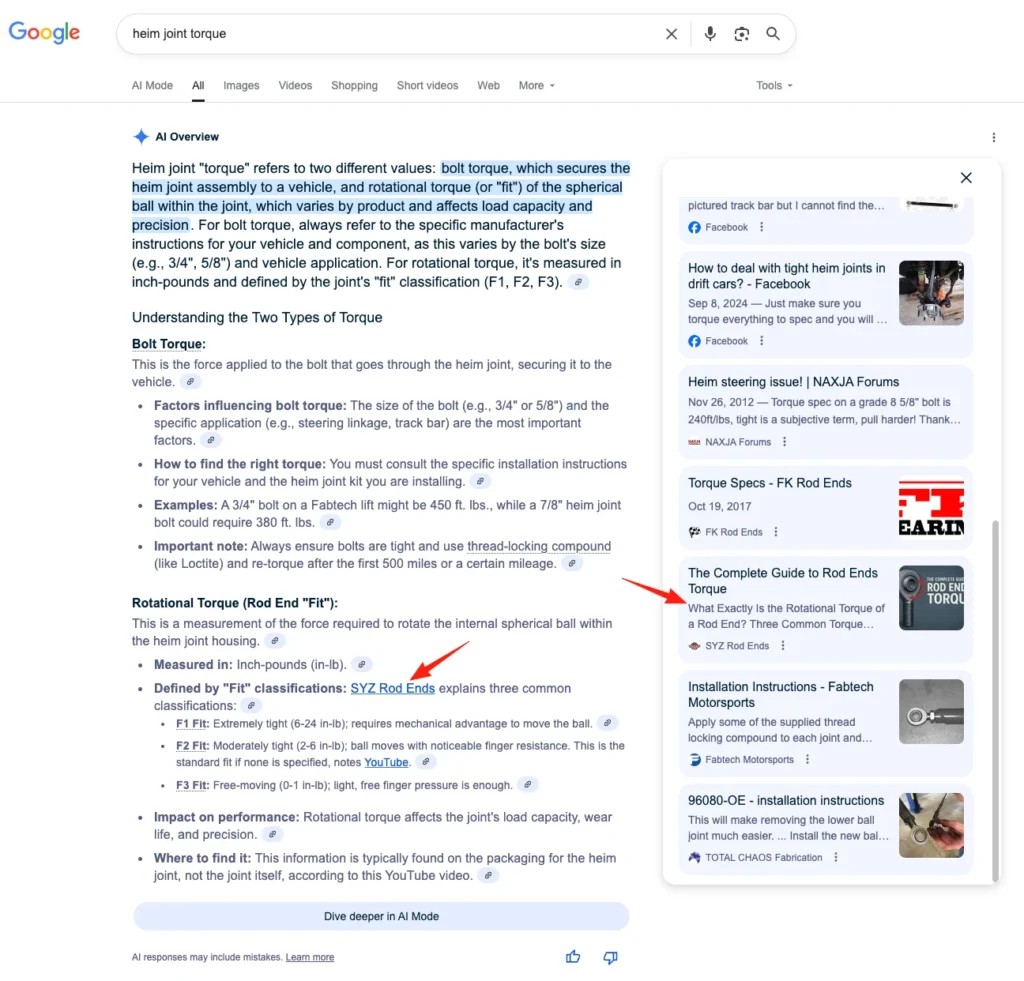
At this point you might be wondering whether these articles were written word-for-word by hand. They weren’t — most of them were created with ChatGPT’s help. That raises the obvious follow-up: doesn’t Google’s algorithm treat AI-generated content as spam? No, and that’s a common misconception. Google Search’s official guidance on AI-generated content makes its position clear below.
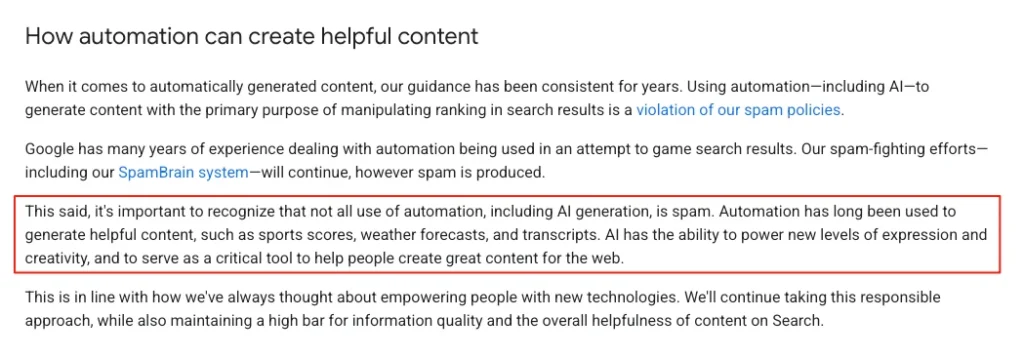
As long as content provides real value to users, it won’t be penalized simply for being AI-generated. You can confidently use ChatGPT to assist your writing — but that doesn’t mean throwing a topic at it and copy-pasting the output straight onto your site. The nine steps below are what separates a citable article from generic AI filler.
Start From a Good Topic, Not a Random One
The first step in blogging is choosing a topic, and most people do it on intuition. If your goal is to get cited by Google AI Overview, Gemini, or ChatGPT, you need to be more deliberate — a good topic can get cited even when the article itself is only average. So what makes a topic “good”?
1. Choose a Low-Competition Topic
On one of our project sites, a single blog post has ranked on page one of Google for years for its seed keyword — and gets occasionally cited by AI Overview too. It’s just one paragraph, about 100 words, with no headings, structure, images, or videos. It ranks well purely because the topic faces almost no competition.
To find topics like this, run a competitor’s domain through SEMrush and filter their keyword list for low keyword difficulty (KD) but still-reasonable traffic. That combination surfaces low-competition, high-potential topics fast.
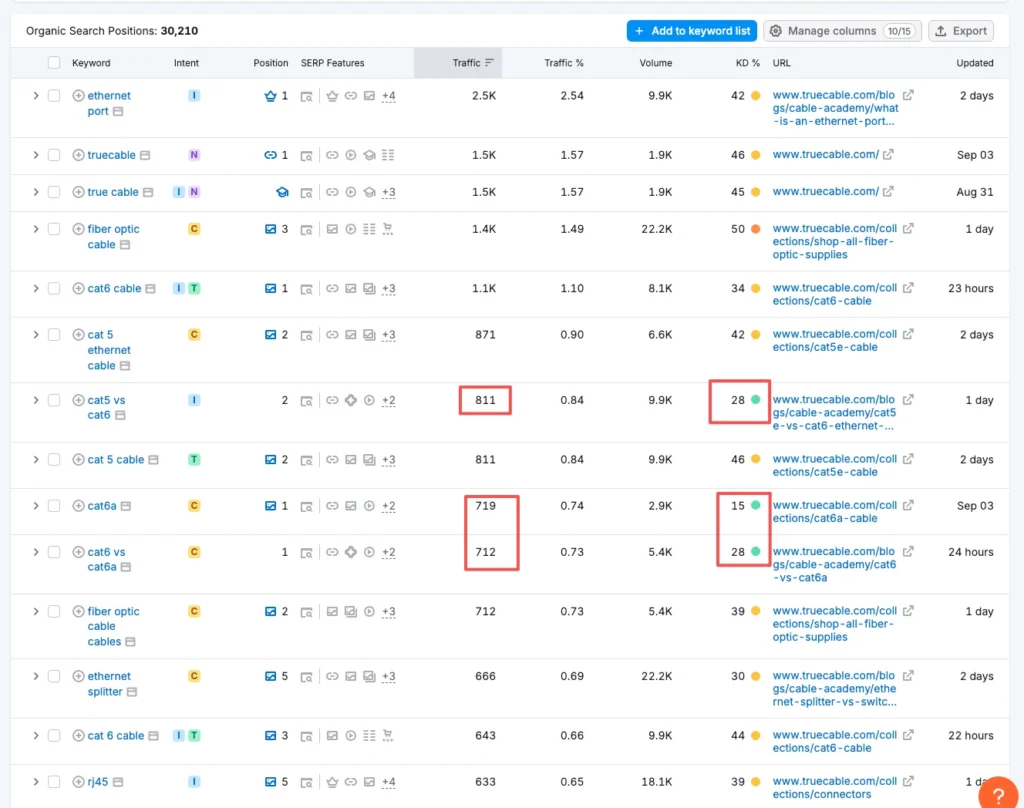
For more on keyword research itself, see my guide: How to Find SEO Keywords.
2. Build Topics Around User Needs
Ask what your target readers are actually searching for and what worries them most. A SaaS site, for example, should pay close attention to price comparisons, how-to guides, and best-practice questions. Three fast ways to surface these topics:
- Type a core keyword into Google and check “People Also Ask” — often a goldmine of topic ideas.
- Search that keyword on Reddit or Quora and see which threads generate the most discussion.
- Search it on social platforms to find high-engagement conversations.
3. Mine Topics From Your Own Products or Services
Start from what you sell and expand outward — frame it as a question (what is, which is best, how to), a usage guide, an application scenario, or an “X vs. Y” comparison. Ask ChatGPT to brainstorm a list from your product line, then filter for business fit, or use a tool like Deep Market to expand a core keyword into related topics. Together these form a topic cluster around your product or service.
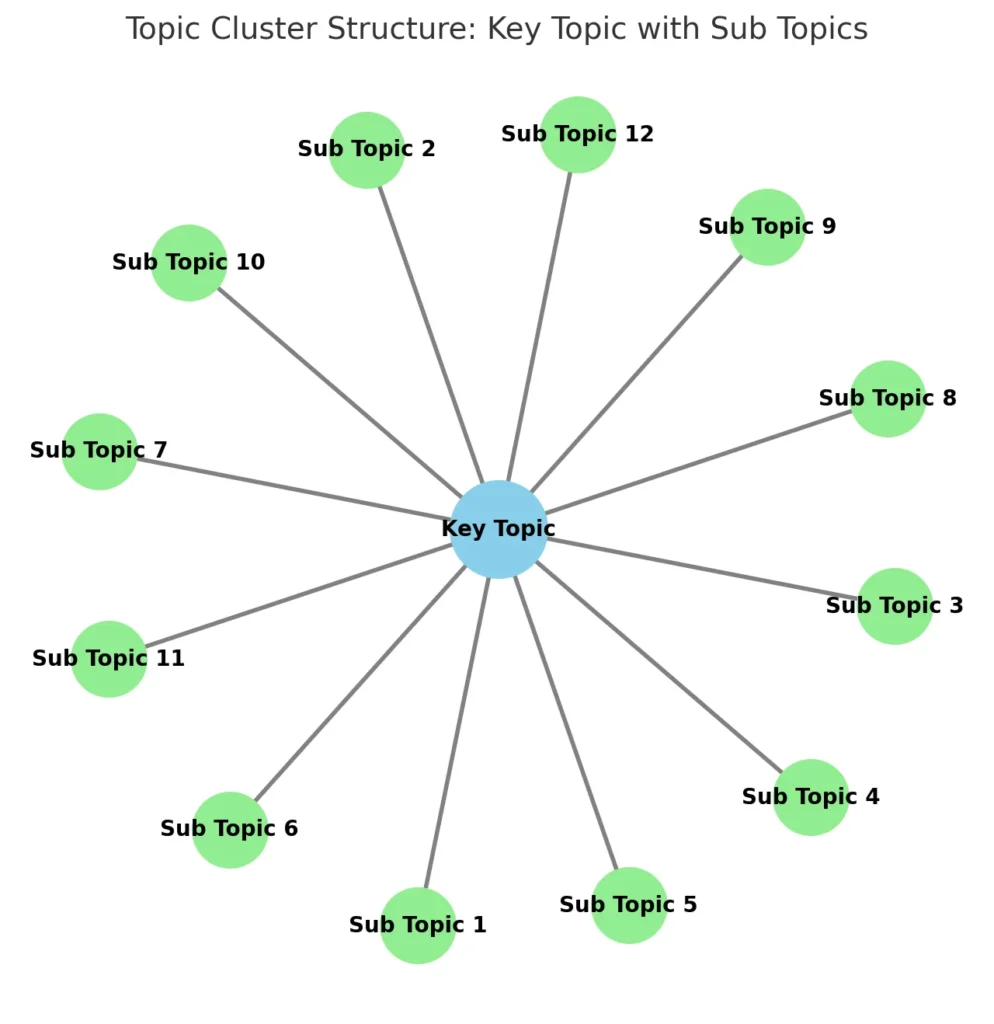
The central node is your core topic; the surrounding nodes are sub-topics, and any sub-topic that’s also a target keyword can graduate into a new core topic. The upside is comprehensive coverage — the downside is that it can turn into an echo chamber of articles nobody actually searches for, so keep validating demand as you go.
4. Watch Trending Topics
Use Google Trends to track how a topic’s popularity moves over time, and tools like Exploding Topics or AnswerThePublic to surface emerging questions early. AI models tend to prioritize fresh content when generating answers, so trending topics improve your odds of getting cited.
Define Your Keywords
Once you’ve picked a topic, define the keywords for it. A keyword is simply the term someone types into Google or ChatGPT — the closer your content matches those terms, the more likely it is to get indexed and cited. There are four keyword types worth knowing:
| Type | What it is | Example (this article) |
|---|---|---|
| Focus Key Phrase | The main keyword you most want to rank for | ChatGPT writing |
| Related Key Phrase | Terms closely tied to the focus keyword, often appearing together | AI writing, SEO blogging |
| Long Tail Key Phrase | Longer, more specific queries — lower volume, higher precision | How to use ChatGPT to write a GEO-friendly blog |
| Semantic Key Phrase | Contextually related terms, not synonyms, that naturally appear alongside the topic | Prompts, generative AI, search engine optimization |
Strictly speaking, only Related and Semantic keywords count as LSI (Latent Semantic Indexing) terms — but in the LLM era, nobody really cares about that label anymore. What matters is whether your article covers the full semantic field of the topic.
To use ChatGPT for keyword discovery, decide your focus key phrase yourself first — from your own research, not from ChatGPT — then prompt it directly: “You are an SEO expert. You are helping me write a blog titled ‘How to Use ChatGPT to Write a Blog Easily Cited by AI.’ I have set the focus key phrase as ‘ChatGPT writing.’ Based on this, please generate a list of related keywords, long-tail keywords, and semantic keywords.” Validate whatever it returns with a tool like Ahrefs, Semrush, or Google Keyword Planner to check real search volume and difficulty.
Older SEO obsessed over exact keyword matches. Today’s large language models understand semantics well enough that phrasing things differently is fine, as long as you fully cover the topic — your content can still be recognized and cited.
Gather Reference Materials
Before writing, gather materials so ChatGPT has less room to hallucinate. The process:
- Search your target topic on Google.
- Collect the top 5 ranking articles.
- Save them as Word documents.
- Upload them to ChatGPT.
- Ask ChatGPT to summarize each article’s structure.
This gives you a quick, accurate picture of how the best-ranking content in your niche is actually built.
Build a Clear Article Structure
With materials in hand, build the skeleton. Most people scan rather than read every word — a wall of text with no hierarchy loses readers in seconds, and a lost reader is wasted effort for both of you. A useful test: if you glance at the article and can’t immediately tell what it’s about, your readers won’t stand a chance either.
Structure isn’t just a courtesy to readers — it’s also an SEO signal. If readers bounce right after landing, GA4’s engagement rate drops, and a page users don’t like is a page Google won’t favor either. A clear structure serves both audiences at once.
Use the summaries ChatGPT produced in the materials step: have it strip duplicate sections across your 5 reference articles and merge what’s unique into one structure more comprehensive than any single source. Then add the human element — your own opinions (even rough ones ChatGPT can help expand), counterarguments you can support, supporting data with sources cited, company case studies, images, videos, or comparison tables, and a cleanup pass on ChatGPT’s often-verbose outline. That combination — AI-assisted, human-driven — is what a solid framework looks like. Four elements matter most:
Start Strong
The first paragraph is the entry point: tell the reader what problem the article solves, or pose a question that sparks curiosity. This article opened with a real case — “cited by Google AI Overview in 2 days” — precisely because a concrete result grabs attention faster than an abstract promise.
Build Up Step by Step
Break the body into H2/H3 modules like building blocks: background/definition (“What is XXX?”), steps/methods (“5 Methods of XXX” with H3 subsections), case studies/data (“2 Cases of XXX”), and a short takeaway sentence closing each section. This is easy for readers to skim and just as easy for AI models to parse.
Close With Impact
Never end weakly. Summarize the main points, give readers a call to action (comment, bookmark, share), and point to a next step — related links or a product/service intro.
Feed AI a Clean Structure
Search engines and AI models both prefer content with clear logic. Structured headings, short paragraphs, and lists let AI identify what problem each section addresses — a clean structure is effectively pre-labeling your content for AI.
Sketch an outline before writing, even a few bullet points — it saves time and prevents chaos. And keep paragraphs under 200 words; long unbroken blocks are exhausting to read.
Enrich Your Content Formats
A single format rarely carries a whole article. Mix these depending on what each section needs:
| Format | Use it for | Notes |
|---|---|---|
| Bold / italics / highlights | Emphasizing key points, guiding the reader’s eye | Don’t leave the article as one plain block of text |
| Bullet points | Breaking down long paragraphs | Improves scanning and readability |
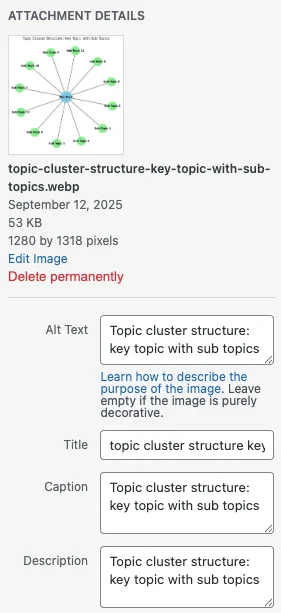
| Images | Illustrating important points | Use descriptive file names; add alt text, caption, and description; mention the image’s purpose in the surrounding text |
| Videos / GIFs | Explaining a concept better than a still image can | Create your own where possible, or embed high-quality existing ones |
| Comparison tables | Wrapping up an H2 that has multiple H3 sub-sections | Pair with a short summary paragraph — AI models favor this format because it’s structured and easy to reference |
The screenshot below shows how to add alt text, caption, and description to an image in WordPress.
Start Writing With ChatGPT
By this point your ChatGPT thread already contains the topic, validated related/long-tail/semantic keywords, prepared non-text assets, and a structure with human input baked in. That’s the setup — now write. Don’t ask ChatGPT to generate the whole article in one shot; control the output with a sequence of prompts instead. Here’s the template I use:
You are a copywriter helping me write a blog post (topic: XXX).
Please follow these requirements:

Topic: XXXXX
Language: English
Blog type: Technical blog
Accepted tone: Relaxed, readable, "industry friend" tone
Rejected tone: Stiff, textbook-like tone
Rhetoric: Keep it simple and direct; avoid flowery metaphors
Audience: Industry buyers, procurement engineers, mechanical modifiers
Focus key phrase: XXXXX
Related / Semantic / Long-tail key phrases: as listed above
Word count: 1,500

Keyword placement
1. Opening and conclusion must include the focus key phrase + 1-2 related phrases
2. Sprinkle keywords naturally across headings and paragraphs — no stuffing
3. Focus keyword can appear in some headings, not every one

Title structure
1. One H1 (post title)
2. Several H2
3. H3 where appropriate — not under every H2

Content requirements
1. Go deep, no shallow overviews
2. Bullet points where natural, not in every section
3. Pros & cons selectively, not in every section
4. Each paragraph under 200 words
5. Use transition words for flow

Outline
1. Introduction, no heading, ~80 words
2. First H2: XXXXXXX
3. Second H2: XXXXXXX (H3s as needed, close with a
   comparison table + short summary paragraph)
4. Third H2: XXXXXXXX
5. Fourth H2 onward as needed
6. Conclusion, ~80 words

Do not write yet. If you fully understand, reply yes.
Once ChatGPT confirms, move to the next prompt: “You will write my blog in segments. First, write the introduction and the first H2 section.” Review each segment for tone and word count — ChatGPT tends toward flowery metaphors, so tell it to cut them and stay direct. Approve one segment before moving to the next.
AI is far less likely to hallucinate on a short output than a long one. Segmenting feels slower, but it produces noticeably more controllable, accurate results — worth the extra back-and-forth.
Refine the Article
With a full first draft in hand, work through this checklist:
- Highlight the most important points using quotes, bold, italics, or background highlights.
- Insert the images, videos, GIFs, and tables you prepared earlier.
- Give the full article to ChatGPT and ask it to suggest 1-2 spots for external authoritative links — supporting data, term explanations, or related reading.
- Edit the URL into a clean, readable slug that includes the focus key phrase — the post title itself often works well.
- Write a click-worthy SEO title containing the focus key phrase.
- Write a concise meta description — ask ChatGPT for a few versions and pick the strongest.
- Write a summary/excerpt capturing the main point, placed at the very top of the article.
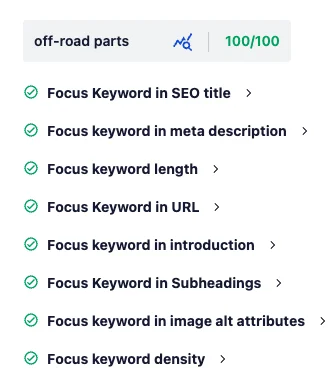
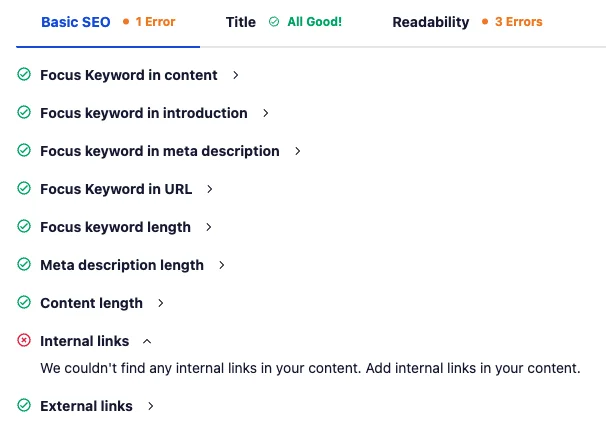
- Run the finished draft through an SEO plugin. I use All in One SEO Pro to check keyword distribution and get an overall score.
Prioritize domains ending in .gov (government), .edu (academic), or .org (nonprofit) first. Wikipedia and other high-authority .com sites are solid fallbacks.
Final Optimization Before Publishing
Two steps left before hitting publish.
Create a cover image. Once the draft is done, ask ChatGPT to generate a 16:9 cover image based on the full content — by this point in the back-and-forth, it understands the article well enough that the result is usually accurate on the first try.
Set up Schema tags. This step gets skipped often, but Schema markup is what tells search engines and AI models what type of page you have and what it’s about. I use All in One SEO Pro‘s Schema feature to configure the article title, excerpt, cover image, keywords, and publish/update dates — then verify it with Schema Markup Validator.
Conclusion
That’s the full workflow: choosing a topic, defining keywords, gathering resources, structuring content, writing with ChatGPT, and final optimization before publishing. Real results come from practice and iteration — different sites, industries, and audiences call for different tuning. The constant is this: build content that serves search engines and real readers at the same time.
Follow this process consistently and each article you publish gets more structured, more professional, and more likely to be cited by Google AI Overview, Gemini, and ChatGPT. Now it’s your turn. 🚀
every Thursday.
Hosting reviews, builder comparisons, performance tips, and plugin picks — curated weekly for WordPress site owners and builders.